

Etsy Social Media Calendar: Build One That Runs Itself

An Etsy social media calendar is a simple plan for what you post, where and when, built around your listings, your seasons and the hours you really have. The best one for a solo seller is the one that gets produced and published every week without a Sunday-night scramble. Xyla was built for that: it turns your Etsy listings into reels, carousels and videos and posts them on a schedule, so the calendar fills itself from the products you already have.
Below you will find what belongs in the calendar, how often to post, a four-week layout you can copy, and how to measure whether it sends buyers to your shop.
TL;DR
- A calendar has two layers: a monthly view for holidays, launches and sales, and a weekly view for the actual posts, times and visuals.
- Etsy’s own guidance says consistency beats volume: three posts a week every week beats a burst of posts followed by silence.
- A realistic solo-seller rhythm is a few Reels, a couple of feed posts or carousels, and daily Stories, produced in one batch session.
- Track one or two numbers, such as reach and link clicks, and use Etsy Stats to see whether Instagram sends visitors.
- Xyla’s Etsy plans start at $29 per month and automate the content creation and publishing that make a calendar hard to keep.
Table of Contents
- What an Etsy social media calendar is for
- The two layers: monthly plan and weekly plan
- Decide your content mix before you fill the dates
- How often to post
- A four-week template you can copy
- Captions, hashtags and the link
- Use Share and Save so your posts can pay you back
- Run the calendar: batch, schedule, respond
- Measure what the calendar earns you
- Promo: let your listings fill the calendar
- Perspective
- FAQ
- Sources
What an Etsy social media calendar is for
Etsy’s Seller Handbook explains that an editorial calendar helps you balance different types of content, from new item photos to behind-the-scenes videos, so your feed is not only product promotion. Once you add fixed dates such as product releases, sales and holidays, gaps and campaign themes become easy to see.
For a one-person shop that means three practical benefits:
- You stop deciding what to post every morning. The decision is made once, in advance.
- You see the busy seasons coming. Etsy advises preparing campaigns for holidays and seasonal shifts at least two months in advance, which is when gift shoppers start browsing.
- You can spot overlaps. Two promotions in the same week compete with each other, and a calendar shows that before you publish.
The two layers: monthly plan and weekly plan
Etsy’s guide to building a calendar suggests a simple split. A monthly view holds the high-level items: campaigns, social media holidays, new collections. A weekly view holds the detail: post text, posting times and links to the images. In Etsy’s example, this lives in Google Sheets or a shared calendar, one tab per level.
The same guide gives timing rules worth copying. Plan larger campaigns at least a month ahead, finalize individual post details the week before so they stay timely, and leave a few open slots each month for things you cannot predict, like a review you want to share or a trend that suits your product.
What goes in the monthly plan
- Launches and restocks, with the date the listing goes live.
- Sales and promotions, with start and end dates.
- Gift-giving moments relevant to your niche: Valentine’s Day, Mother’s Day, back to school, Halloween, the holiday season.
- One theme per week, so your posts feel connected rather than random.
What goes in the weekly plan
- The post format (Reel, carousel, single image, Story).
- The listing or topic it features.
- The caption, hashtags and the call to action.
- The day and time to publish.
Decide your content mix before you fill the dates
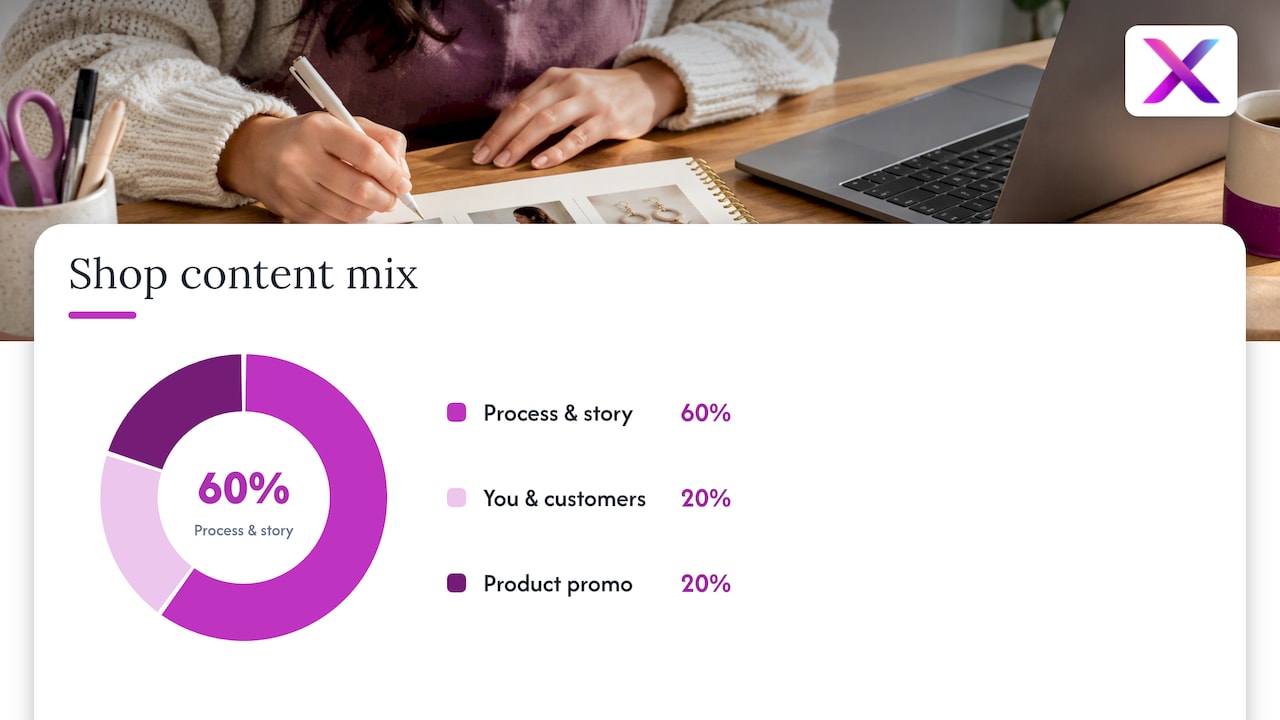
A calendar full of “new listing!” posts burns out followers. Etsy’s own social media manager uses a 60/20/20 split: 60% helpful editorial content, 20% original social content such as quotes and behind-the-scenes videos, and 20% larger promotional campaigns and launches. You will not have an editorial library like Etsy’s, so adapt it for a shop: about 60% process, story and helpful content, 20% your personality and customers, 20% direct product promotion.
Etsy’s own Instagram strategy guide makes the same point from the audience side. It says candid, behind-the-scenes access is what people enjoy, while overly promotional images or content copied over from other channels look out of place and weaken your brand.
Post ideas that fill a calendar quickly
Etsy’s Fresh Social Media Ideas article suggests these recurring types:
- Process or listing videos
- New listings
- Your most popular item
- Custom pieces for a customer
- Five-star reviews
- Day-in-the-life clips: checking orders, printing labels, packing, a trip to the post office
Craftybase’s 2026 guide adds Reel formats that suit makers: 15 to 30 second process videos, before-and-after transitions, packaging an order, close-up detail shots and answering common questions to camera. Assign one of these types to each weekday and your calendar has a skeleton you can reuse every month.
For listing-based formats, our guides on Instagram carousel ideas and Reels for ecommerce show how to turn one product into several posts.
How often to post
Etsy says a few posts a week is a good baseline, the ideal cadence is one or two a day, and posting three times a week consistently beats posting four times in one day and forgetting about it. The Seller Handbook’s Instagram guide recommends one to three posts per day for a presence that is consistent without being intrusive.
For a solo seller, Craftybase suggests 2 to 3 Reels a week, 1 to 2 feed posts or carousels, and daily Stories of three to six frames, roughly five to seven pieces of content a week. That is a lot to create by hand next to making and shipping orders, which is why the calendar needs a production system, not just a plan.
When to publish
Etsy notes research suggesting an Instagram post stays viable for around 19 hours before engagement and reach start to fall, and advises checking your own metrics for the best times. Your audience’s habits matter more than any general rule. Our best time to post tool and the guide to ecommerce posting times explain how to test slots and track which ones lead to sales.
A four-week template you can copy
This layout assumes about five pieces of content per week plus daily Stories. Swap in your own products and seasons.
Week Theme Reel 1 Reel 2 Feed post or carousel Stories 1 Meet the maker Process video of your best seller Studio tour Carousel: materials and where they come from Daily behind-the-scenes 2 Social proof Packing an order Before-and-after of a custom piece Five-star review as a quote card Polls, customer questions 3 New and seasonal New listing reveal Gift idea in 15 seconds Carousel: gift guide with prices Countdown to a launch or sale 4 Helpful and personal Answer a common question to camera Day in the life Carousel: care or how-to tips Q&A, link to the shopKeep one or two open slots a month, as Etsy recommends, for a trend or a customer photo. Our guide to Instagram Stories for ecommerce covers the daily Story layer.
Captions, hashtags and the link
Etsy advises captions that relate to the visual story, with five to ten relevant hashtags. Because the purchase happens on Etsy, every post needs one clear next step, usually the link in your bio. Write your calls to action in the weekly plan so they are not an afterthought. If captions are the part you dread, see our notes on writing AI social captions for ecommerce.
Use Share and Save so your posts can pay you back
Etsy’s editorial calendar article describes a program called Share and Save: when you share a unique shop, item or promo-code link and a sale results, 4% of the order total is deducted from your Etsy fee bill. That makes the link you put in each calendar entry worth planning. Our guide to promoting Etsy on Instagram shows how to keep that tracked link in your posts, and the page on autoposting Etsy listings to Facebook covers doing so without losing it.
Run the calendar: batch, schedule, respond
A calendar only works if the posts get made. The routine that holds up for busy sellers has three parts:
- Batch the creation. One session a week or month to produce visuals and captions together. StableCommerce’s 2026 guide describes a realistic solo minimum of two Reels and three feed posts made in a single batch.
- Schedule everything. Load posts with their publish times so they go out while you are packing orders.
- Respond daily. Etsy’s guide suggests setting aside time each day to review recent posts, reply to comments and check your shop hashtags. Scheduling does not replace being present for the conversation.
For a broader look at building a steady publishing and engagement workflow, this piece on optimizing social media for business growth is a good companion.
Measure what the calendar earns you
Etsy recommends picking one or two marketing metrics to track, noting your baseline now and where you want to be in a month. For Instagram, a free business profile gives you Insights: reach, impressions, website clicks, most engaged posts, video views and follower demographics.
Two simple calculations from Etsy’s editorial guide:
- Check reach and impressions against your posting times to see whether you publish when your audience is active.
- Engagement rate is the number of people who engaged (likes, clicks and so on) divided by the post’s reach.
Etsy also advises exporting your analytics at least every few months, because platforms expire old post data. Then review monthly: which formats earned the most clicks to your shop? Put more of those in next month’s calendar and fewer of the rest. Etsy Stats shows whether Instagram appears as a traffic source, which ties the calendar back to visits.
Promo: let your listings fill the calendar
The slow part of a calendar is making the content. Xyla is an AI social media management tool for Etsy, Shopify and WooCommerce stores. It converts your product listings into reels, videos and carousels, creates brand-aligned copy, and schedules and publishes them to networks such as Instagram, TikTok, Facebook and Pinterest. We built it to save store owners around eight hours a week.
The Etsy plans are Maker at $29 per month, Shop at $39 per month and Studio at $60 per month, or $209, $281 and $432 per year. AI content generation is part of the standard plans rather than charged as per-generation credits. See the Etsy plans and features to pick the one that matches how many posts and networks you want, and read our walkthrough on how to autopost Etsy listings to Instagram.
Perspective
Most Etsy calendars fail at the same point: the plan is fine, but the posts never get made. A printable planner can tell you that Tuesday is a Reel day. It cannot shoot, edit, caption and publish the Reel while you are cutting, firing or packing.
That is why we think of the calendar as an output, not a document. Your listings already hold the raw material: photos, titles, descriptions, prices. Xyla turns that product data into new, modern, UGC-style videos and images rather than remixing templates, then manages and posts the full calendar for you. Because AI generation sits inside the standard plans, you can plan a full month without watching a credit counter.
Our advice to a solo seller: decide your themes and your seasons, because that is the part only you can do. Let the production and publishing run automatically, and spend the hours you get back, around eight a week for many store owners, on making the products your followers came for.
Toby
FAQ
How far ahead should I plan an Etsy social media calendar?
Etsy recommends planning bigger campaigns and holiday pushes at least one to two months ahead, and finalizing individual post details the week before. Keep a few open slots each month for timely content.
How many times a week should an Etsy seller post on Instagram?
Etsy calls a few posts a week a good baseline and one or two a day ideal, and stresses that steady posting beats occasional bursts. A solo-seller rhythm of 2 to 3 Reels, 1 to 2 feed posts or carousels and daily Stories is a practical target.
What should I include in an Etsy content calendar?
Include fixed dates such as launches, sales and holidays, a theme for each week, and for every post the format, the listing, the caption, the link and the publish time. Add a mix of process, behind-the-scenes, social proof and promotional posts.
How do I know if my calendar is working?
Pick one or two metrics, such as reach and link clicks, record a baseline, and review them monthly in Instagram Insights and Etsy Stats. Repeat the formats that earn the most clicks and replace the ones that do not.
Sources
- Planning an Effective Editorial Calendar (Etsy Seller Handbook)
- Planning an Effective Editorial Calendar, Share and Save details (Etsy Seller Handbook)
- How to Create an Editorial Calendar for Your Blog and Social Media (Etsy Seller Handbook)
- Building a Marketing Campaign (Etsy Seller Handbook)
- How to Market Your Business With Instagram (Etsy Seller Handbook)
- Instagram for business Strategy guide (Etsy)
- Fresh Social Media Ideas for Your Shop (Etsy Seller Handbook)
- Your Handy Marketing Checklist (Etsy Seller Handbook)
- How to promote your Etsy shop on Instagram in 2026 (Craftybase)
- Etsy Instagram marketing guide (StableCommerce)
- How to Optimize Social Media for Maximum Business Growth


