

Film in 2 Minutes: TikTok Content Ideas for Small Shops
Post one trend-driven short clip and one high-reference educational video each week, and you have the two formats that carry the most weight on TikTok right now. Two you can film in under two minutes today: unbox a single product on camera and say what surprised you, or record a 20-second “3 things I wish I knew before buying this” tip using something you already sell. Test both, watch which one holds attention longer, and repeat the winner.
TL;DR:
- Creating trend-driven short clips such as product unboxings or quick tips can be filmed in under two minutes and tested for audience engagement.
- Organizing content ideas around clear structures like hooks, formats, and prompts increases the chances of capturing attention within the first three seconds.
- Batch filming multiple videos, using AI tools for automation, and scheduling posts saves time and helps maintain a consistent posting rhythm.
- A high save-to-view ratio is crucial for long-term reach, as TikTok favors rewatchable content that prompts viewers to save videos.
- Regularly adapting trending formats, like POVs or pack-an-order videos, with a brand-specific twist boosts performance and audience relevance.
Table of Contents
- 40+ TikTok Content Ideas Organized by Format (With Micro-Templates)
- Trend Formats Worth Testing in 2026 (And How to Make Them Yours)
- Hooks, Length, Captions, and the One Metric That Predicts Distribution
- Turning a Content Calendar Into Scheduled Posts Without Burning a Weekend
- What Actually Separates Consistent Creators From the Rest
- Let Xyla AI Handle the Repeatable Half of Your TikTok Calendar
- Sources
40+ TikTok Content Ideas Organized by Format (With Micro-Templates)
Scrolling for inspiration burns more time than filming does. The fix is a stocked idea bank organized by format, so you grab a template instead of staring at a blank camera roll. Creator guides like SocialBaddie recommend building every idea around three parts: a hook, a format, and an engagement prompt. That structure is what turns a vague idea into something filmable in the next ten minutes.
Educational and tutorials
- “3 mistakes people make with [product category].” Hook: “You’re probably doing this wrong.” Length: 20 to 30 seconds. Format: talking head or screen-record with text overlay. Engagement prompt: “Which one did you not know?”
- “How to use [product] in a way most people don’t.” Hook: show the wrong way first, then the right way. Length: 30 seconds. Format: split-screen before/after.
- Quick myth-bust in your niche. Hook: “This common tip is actually false.” Length: 15 to 20 seconds. Engagement prompt: ask viewers to share the myth they believed.
- “What I’d buy if I were starting over.” Hook: a numbered list read fast over product shots. Length: 30 to 45 seconds.
Product demos and ecommerce
- Pack an order. Hook: “POV: your order just shipped.” Length: 30 to 60 seconds. Format: overhead shot, wrapping paper crinkle sounds, trending audio layered underneath.
- #TikTokMadeMeBuyIt spin. Hook: “I saw this everywhere so I had to try it.” Length: 20 to 30 seconds. Format: reaction shot plus product close-up.
- 60-second demo answering one specific question (“does this actually work on curly hair,” “does this fit a laptop”). Engagement prompt: “Comment your question, I’ll test it next.”
- Size, texture, or sound comparison between two products you sell. Format: split-screen.
- “What’s in my order” haul-style video shot from the customer’s point of view. Xyla AI can turn a product photo into this style of clip automatically, which is worth trying if filming live orders is not always possible.
Trend takes and transitions
- Trending audio remixed with a product reveal on the beat drop. Hook: silence for the first second, then the transition hits.
- A current transition format applied to a before/after of your product. Format: two outfits, two setups, or two results.
- “Adding my own twist to this trend” caption, explaining the niche spin in text overlay.
POV and storytelling
- “POV: you finally found the [product] that works.” Hook: first-person camera angle.
- A day in the life of running your store. Length: 45 to 60 seconds. Format: quick cuts, voiceover.
- The origin story of one product, told in three sentences over process footage.
Behind-the-scenes and process
- How a product gets made or packed, shot in one continuous take.
- A mistake you made early on and what changed. Engagement prompt: “What’s a mistake you learned from?”
- Restocking or inventory day, sped up with trending audio.
Community prompts and duets
- Reply to a customer comment with a full video answer.
- Duet a customer’s review or unboxing (with permission).
- “Finish this sentence” prompt related to your niche, read aloud with a text overlay for replies.
Challenges and dance
- A low-effort version of a trending challenge adapted to your product category.
- A “can you guess” game where viewers predict a price, ingredient, or result.
ASMR and sensory
- Close-up sound of packaging, texture, or product use with no talking, just captions.
- Slow-motion product reveal with ambient sound only.
Each of these ideas takes one line to plan and one setup to shoot. Pro Tip: Keep a running notes app list titled “Hooks I Liked This Week.” Whenever a video stops your scroll, write down the exact first sentence. That’s your swipe file for the next batch.
Trend Formats Worth Testing in 2026 (And How to Make Them Yours)
Copying a trend word-for-word rarely performs as well as remixing it for your audience. Shopify’s trend research found that brands adapting formats like GRWM, #tiktokmademebuyit, and POV videos with a brand-specific spin consistently outperform straight imitations.
- POV format: instead of a generic scenario, script a POV specific to your customer’s exact pain point (“POV: you finally found gloves that don’t fall apart in month one”).
- GRWM (get ready with me): pair it with your product line instead of general fashion, and narrate why each item made the cut.
- Pack-an-order: film it from the angle a customer would want to see, not just an overhead flat lay. Try a first-person unboxing reveal instead.
- Fit check: apply the format to non-apparel products by showing “does this fit my kitchen,” “does this fit my desk setup.”
- Nostalgia trends: connect an old product photo or founding story to a current nostalgia sound.
- Transitions: use the transition beat to reveal a product result, not just an outfit change.
- Trending sounds: check Later’s weekly trend roundups for audio that’s rising but not yet oversaturated, and swap in your product where the trend calls for a reveal.
An ecommerce-specific example: a candle shop takes the “kinda chic” aesthetic trend and shoots their pouring process with the trending audio, captioned “kinda chic, kinda made in my kitchen.” Same format, completely different niche.
Pro Tip: Set a 48-hour rule. If a sound or format is trending, film your version within two days. Audio relevance drops fast, and a late remix reads as behind rather than current.
Hooks, Length, Captions, and the One Metric That Predicts Distribution
The first one to three seconds decide whether someone keeps watching or scrolls past. Skip the slow intro and open mid-action, mid-sentence, or on the most visually interesting frame you have. “Wait for it,” “you’re doing this wrong,” and “nobody talks about this” are overused but still work because they promise a payoff fast.
- Hook immediately. Cut the throat-clearing. Start on the reveal, the question, or the surprising result.
- Length: 15 to 34 seconds performs consistently well for most trend and product content; educational tutorials can run 45 to 60 seconds if every second earns its place.
- Subtitles and captions: burn in text for sound-off viewers, and write the on-screen caption as its own hook, not a repeat of your spoken words.
- Hashtags and audio discovery: use two or three specific hashtags tied to your niche rather than ten generic ones, and lean on trending sounds since TikTok increasingly functions as a search platform where spoken words and captions get indexed.
- Cadence: aim for four to six posts a week if you can, with at least one educational post included.
Educational content tends to produce the highest save-to-view ratio of any format, and saves are one of the strongest signals TikTok’s distribution system rewards. Watch that ratio before you watch total views. A video with modest views but a high save rate often keeps getting pushed to new audiences days after posting, while a high-view, low-save clip usually dies fast. Statista’s data on TikTok usage shows how much daily attention the platform commands across major markets, which is exactly why a saveable, rewatchable format pays off over time.
Turning a Content Calendar Into Scheduled Posts Without Burning a Weekend
Batching ideas is only half the job. The workflow that actually saves time looks like this: batch ten ideas in one sitting, write scripts and captions in the same sitting, shoot with a repeatable template, resize for vertical, then schedule across networks instead of posting one at a time.
- AI Posts and Brand Kits (Xyla AI’s terms for its automated content and style presets) turn a product photo into a ready reel, complete with captions and hashtags, without a manual edit.
- Store owners using this kind of automation report saving roughly eight hours a week that used to go into manual posting.
- Automated posts work best for the recurring formats above (pack-an-order, product demos, quick tips). Save your own filming time for the personal, behind-the-scenes, and community-reply videos that need a real human voice.
Viewers can tell which is which, and both have a place in a healthy content mix.*
What Actually Separates Consistent Creators From the Rest
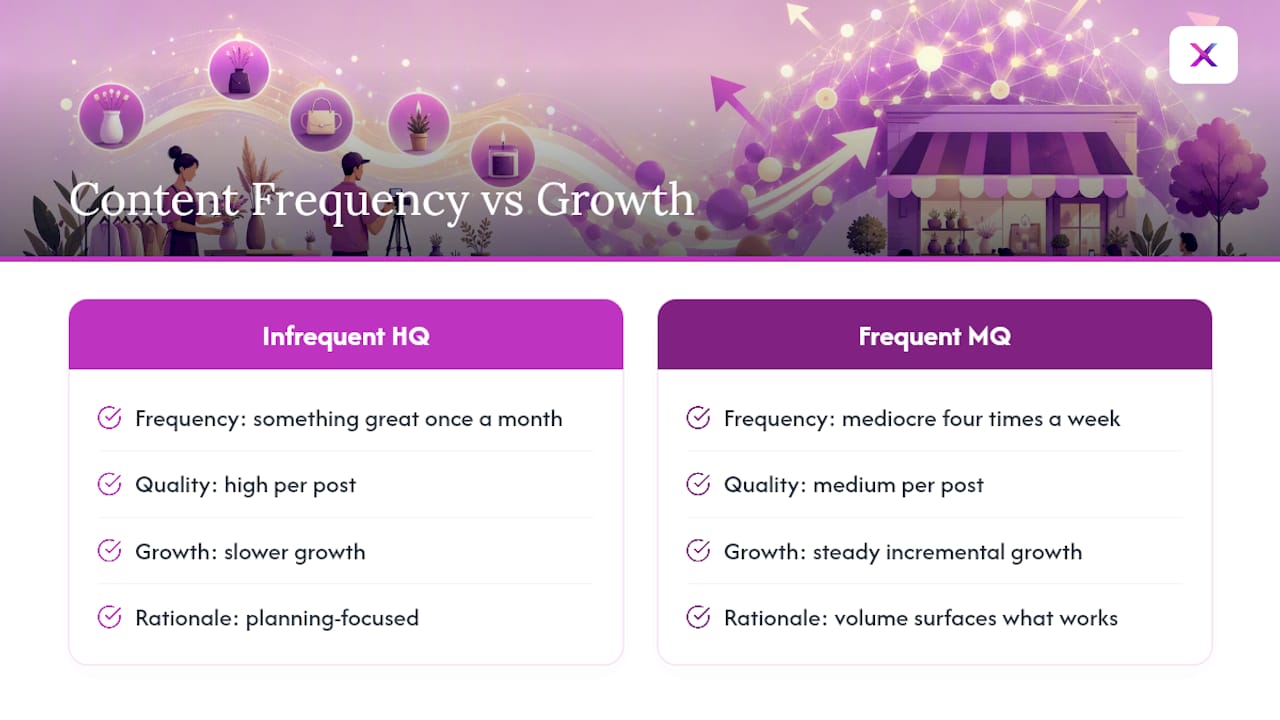
Most advice about TikTok obsesses over finding the “perfect” idea before hitting record. That’s backward. The creators and store owners who grow steadily are the ones who film something mediocre four times a week instead of something great once a month. Volume surfaces what works faster than any amount of planning does.
A simple ritual worth stealing: batch five hooks every Sunday, even bad ones, before you touch a camera. Half will get cut. The other half becomes next week’s posts. That five-minute habit does more for consistency than any trend report.
Pick one idea from this list. Film it in the next hour, before the excitement wears off.
— Toby
Let Xyla AI Handle the Repeatable Half of Your TikTok Calendar
If you sell on Shopify, WooCommerce, or Etsy, the ideas above still need someone to script, shoot, edit, and schedule them, and that’s the part most store owners quietly fall behind on. Xyla AI turns your existing product listings into ready-to-post reels, carousels, and captions, then publishes them across TikTok, Instagram, and Facebook at the times your audience is actually active.

This fits you if any of the following sounds familiar: you’re managing social media alone with no marketing hire, you have more products than you have hours to film them, or you keep meaning to post consistently and keep missing weeks instead. Xyla AI’s AI-generated video and image tools can turn a single product photo into UGC-style content without a camera crew, freeing up your time for the personal, behind-the-scenes videos only you can make. Start a free trial and see how much of your calendar you can automate your social media marketing with today, before this week’s batch of ideas goes stale.
Sources
Shopify, Later, Hootsuite, Statista, and SocialBaddie informed the trend formats and idea structures above. For a broader look at how AI fits into content workflows, Babylovegrowth’s guide to AI content tools is worth a read.
- Top TikTok Trends in 2026: 18 Ideas To Go Viral
- Current TikTok Trends to Try in 2026 | Later
- Time spent on TikTok app in selected countries
- 22 Viral TikTok Content Ideas: Proven Strategies for Explosive Growth
- 11 of the most important TikTok trends to watch in 2026


