

Shopify TikTok Integration: Automate Reels From Your Catalog
Yes, you can automatically generate, brand, and schedule TikTok reels from your Shopify catalog using AI-powered tools, and Xyla AI is built specifically for this job. The tool pulls product data straight from your store, turns it into short-form video with captions and hashtags, and posts it on a schedule, saving typical store owners around eight hours a week they’d otherwise spend filming and editing. You do need a TikTok Business account and OAuth publish permission before anything goes live.
TL;DR:
- Automated TikTok posts perform best with daily or five to seven times weekly schedules, especially when targeting new product launches initially.
- Setting up proper permissions, high-quality source images, and locking your brand tone are crucial to avoid generic-looking content and engagement drops.
- Excluding out-of-stock SKUs and implementing variable posting times within designated windows help maintain natural flow and prevent inventory issues.
- Measuring ROI requires tracking engagement metrics, using UTMs, and comparing revenue against platform and ad costs, with early signals seen in click and watch rates.
- Automation is ideal for catalog-scale posting and evergreen products, while high-impact launches and storytelling still benefit from manual creator-driven content.
Table of Contents
- What A Shopify TikTok Integration Actually Automates
- How Do You Connect Shopify To TikTok For Automated Posting?
- Best Practices For On-Brand TikTok Content
- What Posting Cadence Works Best On TikTok?
- How Do You Measure ROI From Automated TikTok Posts?
- Common Pitfalls And Quick Fixes
- Automation Versus Creators: Finding The Right Mix
- Get Your Shopify Catalog Posting To TikTok Automatically
- Sources
What A Shopify TikTok Integration Actually Automates
A Shopify TikTok integration handles the content side of your marketing, not the commerce side. It pulls product photos, titles, and descriptions from your catalog, then generates short-form video, writes captions and hashtags, picks a thumbnail, applies a template, and queues the post for publishing. That’s the entire job.

What it doesn’t do: sync orders, manage inventory counts inside TikTok, or handle the transaction mechanics of TikTok Shop. Those are separate systems entirely, and confusing the two leads to a lot of wasted setup time.
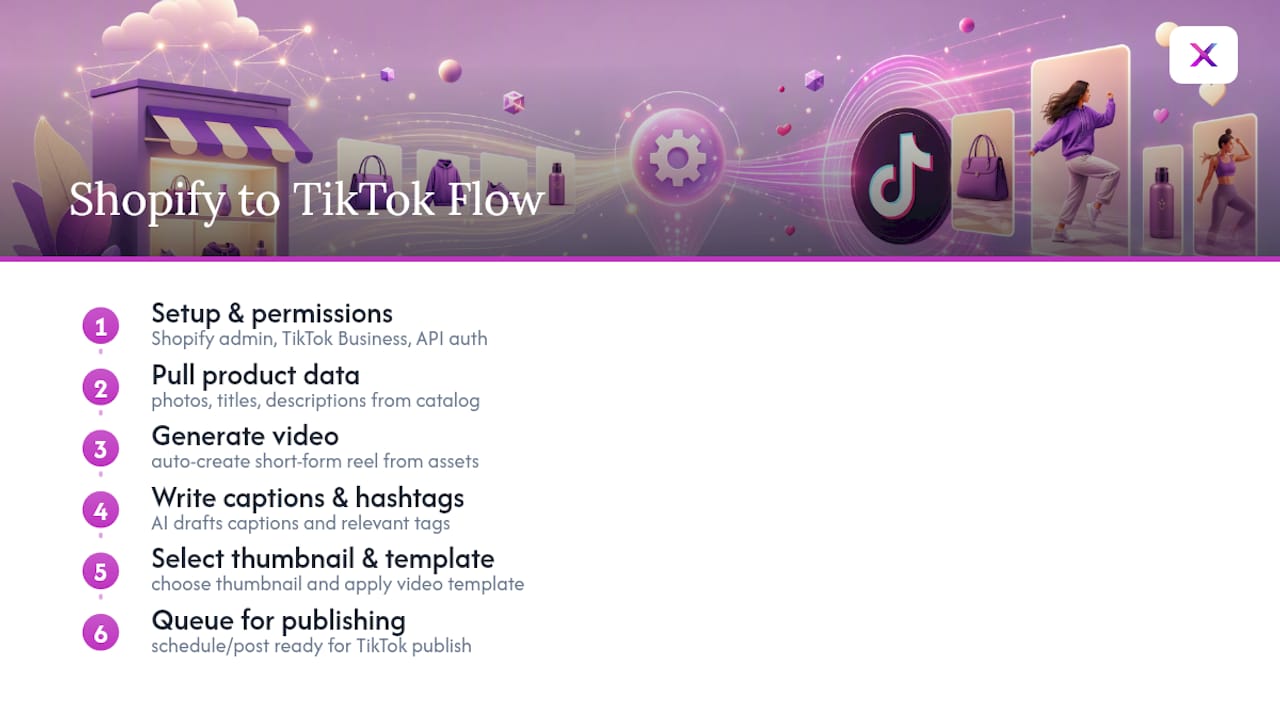
To get any of this running, you need Shopify admin access, an active TikTok Business account, and you’ll grant a third-party app publishing authorization through TikTok’s API. Some things still need a human hand no matter how good the automation gets: creator partnerships, live shopping events, and any post making a compliance-sensitive claim (health benefits, guarantees, before/after results) should go through manual review before they publish.
How Do You Connect Shopify To TikTok For Automated Posting?
Getting your first automated post live takes less time than most store owners expect, but skipping steps is where things go sideways. Here’s the order that actually works.
- Confirm your TikTok Business account. A personal or creator account won’t grant the API permissions automation tools need. If you haven’t upgraded, do it before anything else.
- Gather your assets. Pull strong product images and any short clips you already have. A tool like Xyla AI can generate video from static photos, but sharper source images produce noticeably better output.
- Build a Brand Kit. Lock in your logo, color palette, font, and brand voice before you connect anything. This is the single biggest lever for avoiding generic-looking content later.
- Install and authorize. Add the integration inside Shopify, then complete OAuth to link your TikTok Business account. Confirm the app has publish permission, not just read access.
- Map your product sources. Choose which collections feed the automation. Most stores start with best-sellers or a “hero SKU” collection rather than the entire catalog.
- Choose templates and set rules. Pick your video templates, lock any required on-screen text (compliance disclaimers, pricing rules), and define your caption tone and CTA pattern.
- Set cadence and test. Pick a posting schedule and posting windows, then run one or two preview posts to a limited or private audience to check aspect ratios, captions, and pacing before going public.
- Soft launch and watch closely. Track watch time and engagement for the first week. Pause or rework any template pulling below your account average.
Pro Tip: Run your first three automated posts through a private TikTok test account before pointing the automation at your real business profile. Aspect ratio and caption-length bugs are far easier to catch before an audience sees them.
Best Practices For On-Brand TikTok Content
The fastest way to sabotage an automated TikTok feed is to let it drift into generic-looking content. Feed the AI examples of your own top-performing posts, not just a logo and a font, so it has something real to model. That brand-context layer is what separates content that looks like your store from content that looks like a stock template.
Structure matters just as much as branding. A short product script that works on TikTok almost always follows the same skeleton:
- A hook in the first one to two seconds that stops the scroll.
- A product demo running roughly ten to twenty seconds.
- A clear call to action in the final two to three seconds.
Beyond the script, a few habits keep the feed feeling native rather than promotional:
- Favor UGC-style templates and native TikTok audio over polished ad formats.
- Rotate hooks and CTAs regularly so repeat viewers don’t see the same opener five times in a row.
- Group content into pillars (new arrivals, best-sellers, restocks) so the feed has variety instead of one repeating loop.
- Pull automation back during high-sensitivity moments like a collaboration launch or a major sale, where every post needs a human eye.
Pro Tip: Keep four to six example posts in your Brand Kit that show specific product-demonstration angles, not just colors and fonts. That’s what actually trains the tone the AI reproduces.
What Posting Cadence Works Best On TikTok?
Most stores that see consistent traction post daily, or at minimum five to seven times a week, while watching quality signals closely enough to pull back if engagement drops. Consistency beats bursts of activity followed by silence.
- Run separate cadences for new arrivals versus evergreen products. New drops can post more aggressively for a week or two, then settle into the regular rotation.
- Stagger post times across the day rather than publishing everything at once.
- Build in safeguards: skip any SKU with a low-resolution image or missing metadata, and cap how often the same product appears in a given week.
- Set posting windows instead of exact times. A little randomization inside a window (say, 6 to 8 p.m.) tends to read more naturally than a post landing at the identical minute every day.
How Do You Measure ROI From Automated TikTok Posts?
Track watch-through rate, engagement rate, clicks to your product page, add-to-cart rate, conversion rate, average order value, and customer acquisition cost. Attach UTMs to every social link so Shopify and Google Analytics can attribute revenue back to specific posts, and compare that conversion rate against your other channels rather than judging it in isolation.
Automated content platforms have driven engagement increases as high as 724% for early adopters scaling AI-generated social content, though results vary widely by category and execution quality.
A simple ROI check: take incremental revenue from social traffic, subtract your automation subscription cost and any TikTok Shop commissions or fees, then divide by the time you saved plus your ad spend. If you’re running affiliate or in-feed checkout alongside your automated content, factor in platform commission changes, since those cut directly into margin. In the first four weeks, watch for watch-through rates above your account median and rising click rates as early signals the automation is working before revenue numbers fully mature. A dedicated Shopify marketing strategy page can help you build that comparison across channels.
Common Pitfalls And Quick Fixes
Most setup problems trace back to a handful of repeat offenders.
- Permissions errors: if posts fail to publish, check that your account is a TikTok Business account and that the app still has active publish permission. Expired OAuth tokens are the usual culprit.
- Low-quality auto video: blurry or oddly cropped clips almost always trace back to weak source images. Supply higher-resolution stills or short clips, and turn on fallback templates for products with thin asset libraries.
- Content drift: if posts start looking generic again, refresh your Brand Kit examples, lock the tone fields that keep sliding, and run a quick weekly audit of the auto-generated captions.
- Inventory mismatches: exclude out-of-stock SKUs from automation rules entirely, and never let a promotional post go live for a product your fulfillment can’t support if it spikes. Brands running affiliate programs alongside content automation should cap how much revenue concentrates on any single platform to avoid getting caught by an inventory shortfall after a viral moment.
Automation Versus Creators: Finding The Right Mix
Automation earns its keep at catalog scale, when you need consistent posting and don’t have a marketing team to spare. It’s the right tool for restocks, evergreen products, and the daily grind of staying visible.
Manual creators and bespoke content still win for storytelling, product launches, and your highest-consideration SKUs, where a formulaic template can’t carry the weight. The smart path is a pilot: automate one or two collections, measure the engagement lift, then expand once you see it holding.
— Toby
Get Your Shopify Catalog Posting To TikTok Automatically
Xyla AI is the direct route from “I have a Shopify catalog” to “I have a TikTok feed that posts itself,” without hiring an editor or learning a video tool. It connects to your Shopify catalog, applies your Brand Kit across every post, and generates AI video straight from your product photos, complete with captions, hashtags, and a publishing schedule.

Store owners using it back to consistent posting report saving roughly eight hours a week they used to spend on manual content creation, and the guided setup walks you through connecting Shopify and authorizing TikTok step by step, including brand-context configuration so your posts don’t start looking like everyone else’s automated feed. If you’re also running creative on other channels, pairing your posting cadence with hook rotation strategies keeps your ad account from going stale alongside your organic content.
If you’re ready to see it running on your own catalog, start the guided setup and have your first automated TikTok post scheduled before the day ends.
Sources
- TikTok Shop in 2026: The social commerce giant finding its limits
- Neural content engines drive 724% engagement surge as AI-generated marketing transforms e-commerce


