

Multi Platform Posting: The Adapt and Stagger Workflow

Multi-platform posting means publishing content across several social networks instead of relying on just one, and the practice most people call “cross-posting” only works well when you adapt the format for each platform rather than copy-pasting the same post everywhere. The single best practice is simple: build one anchor idea, reshape it into platform-native versions, then stagger the publishing times. That combination protects reach and keeps each post from looking automated.
TL;DR:
- Cross-posting works best for quick, time-sensitive alerts when copying the same message across platforms, without needing native formatting.
- Repurposing content into native formats is essential for building engagement, requiring tailored captions, hooks, and visual adaptations per channel.
- Using automation tools that resize, crop, and schedule content automatically can save small teams up to eight hours weekly on manual posting tasks.
- Respect copyright and permissions; avoid reposting user-generated content or music without explicit approval to prevent takedowns or platform violations.
- Customize messaging based on audience segments, leveraging platform-specific tones and content preferences to improve engagement and click-through rates.
Table of Contents
- What Is Multi-Platform Posting, and When Should You Cross-Post vs. Repurpose?
- Quick Action Plan: What to Do This Week
- Which Formats and Messages Work Best on Each Platform?
- What Should You Look for in a Scheduling Tool?
- How Do You Turn One Idea Into a Week of Platform-Native Posts?
- Technical Checklist: Sizes, Limits, and Caption Rules
- How Do You Measure What’s Actually Working?
- How Xyla AI Automates This Workflow for Store Owners
- Legal and Copyright Considerations When Cross-Posting
- Customizing Messaging for Different Audience Segments
- Author’s Perspective: When to Go Deep vs. When to Adapt Fast
- How Xyla AI Turns One Product Into a Week of Content
- Sources
What Is Multi-Platform Posting, and When Should You Cross-Post vs. Repurpose?
Multi-platform posting is the practice of distributing one core message across several social networks. Cross-posting, technically, means republishing the exact same asset everywhere. Repurposing means rebuilding that asset for each platform’s format and audience. The two get used interchangeably, but the distinction matters for results.
Straight cross-posting works fine for time-sensitive announcements: a flash sale, a restock alert, a shipping delay notice. Nobody expects a native-feeling post for that. Repurposing earns its extra effort when the content is meant to build a following or drive engagement, like a new product story or a behind-the-scenes look at how something is made.
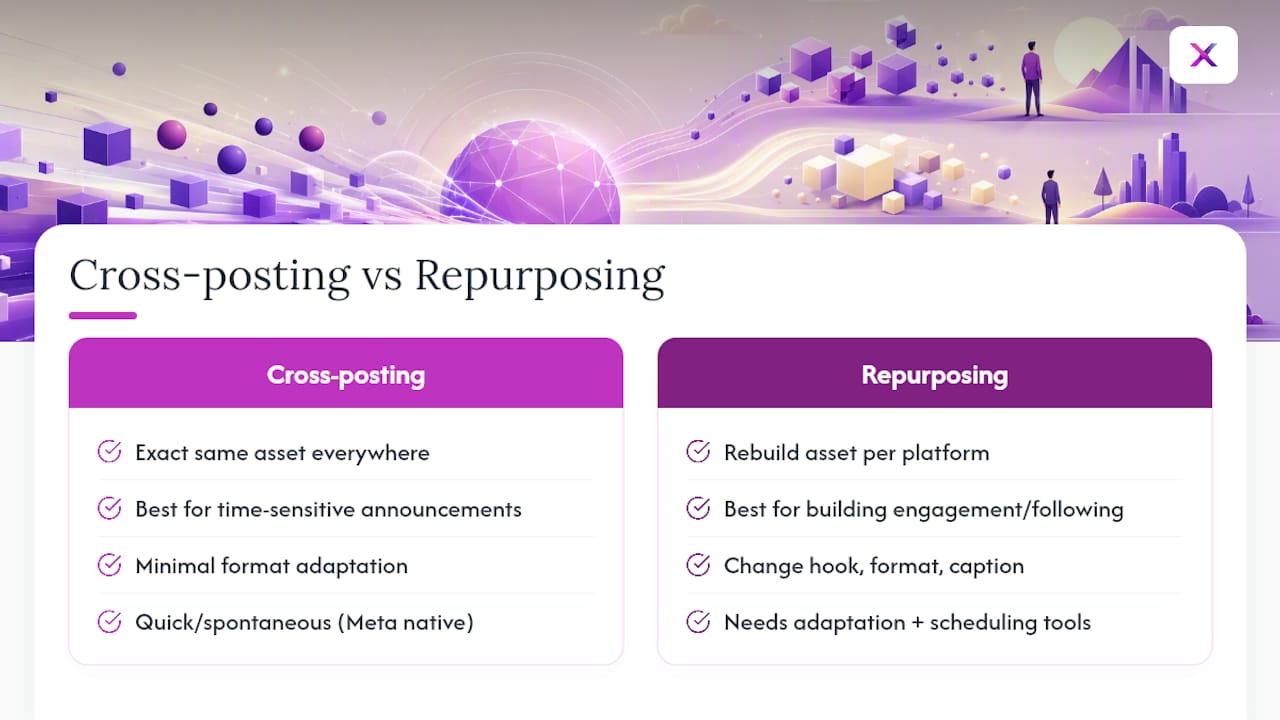
A reframing approach works better than identical replication in most cases. Keep the core idea intact, but change the hook, the format, and the caption for each network. Meta’s own ecosystem allows native crossposting between Instagram, Facebook, and Threads, which is fine for quick, spontaneous content. Anything that crosses outside that ecosystem, say from Instagram to TikTok to Pinterest, needs a third-party scheduling tool to manage the adaptation and timing.
Quick Action Plan: What to Do This Week
You don’t need a full content calendar to start. You need one solid idea and 90 minutes.
- Pick one anchor piece: a product story, a tutorial, or a customer win.
- Extract 3 to 4 assets from it: a tweet-length hook, a LinkedIn post, an Instagram carousel, and a short vertical video.
- Customize captions and hashtags for each platform, respecting character limits.
- Schedule with staggered timing and assign who replies to comments on each post.
- Track one or two KPIs per platform so you know what’s actually working.
Pro Tip: Write the anchor piece assuming nobody will read the original. Every platform version needs to stand alone, hook and all.
Which Formats and Messages Work Best on Each Platform?
Not every idea belongs on every platform, and forcing it usually backfires. Content type needs to match platform audience, meaning data-heavy posts perform on LinkedIn while product showcases perform better on TikTok or Instagram.
- Short-form video (TikTok, Reels, YouTube Shorts): visuals-first, with a hook inside the first two seconds or the viewer scrolls past.
- Long-form and insight content (LinkedIn, blog excerpts): works when there’s a lesson, a number, or a contrarian take worth reading past the fold.
- Micro-posts and hot takes (X, Threads): short, opinionated, timely. A polished product photo feels out of place here.
- Image carousels and product showcases (Instagram, Pinterest): strong for step-by-step content and aspirational product staging.
- Skip a platform entirely when the format doesn’t translate. A dense spreadsheet screenshot has no business on TikTok.
What Should You Look for in a Scheduling Tool?
For an e-commerce store, the scheduler is doing real work: turning product listings into content and getting it in front of buyers at the right moment. A handful of features separate a tool that saves time from one that just adds a new task to your week.
- Per-platform customization, not a single caption pushed to five feeds.
- Automatic resizing and cropping for vertical video, square feed posts, and Pinterest-style images.
- Watermark handling, since a visible third-party watermark can quietly cut how far a video travels.
- Flexible scheduling windows that let you stagger posts instead of firing them simultaneously.
- Cross-platform analytics so you’re not logging into five separate apps to check performance.
Watch free tiers closely. Free cross-posting apps often cap post volume, limit which platforms you can connect, or skip video support entirely, and watermarks tend to show up right where you’d least want them. A free plan is a reasonable way to test a workflow, but plan for an upgrade path once volume grows.
Setup itself is short: connect your store and social accounts, draft the anchor content, customize each platform version, preview it, then schedule content across all channels. A scheduler built around e-commerce product data handles the resizing and adaptation automatically instead of leaving it to you.

How Do You Turn One Idea Into a Week of Platform-Native Posts?
Here’s a workflow you can copy directly. Start with the anchor: one piece of content, usually your best-performing product story or a genuine customer moment. From there, extraction rules decide what gets pulled for each channel; a stat becomes an X post, a process shot becomes a carousel slide, a testimonial becomes a video hook.
- Monday: publish the anchor piece (blog post, long-form video, or detailed product story).
- Tuesday: extract a single sharp line into an X or Threads post.
- Wednesday: build an Instagram carousel from the anchor’s supporting images or steps.
- Thursday: post a discussion-style follow-up on Threads or LinkedIn.
- Friday: release a 15 to 30 second Reel built from the anchor’s strongest visual moment.
Assign roles early: one person drafts, one adapts per platform, one handles replies. A staggered spacing of 24 to 48 hours between related posts keeps each version from competing with itself and gives every post a fair shot at organic distribution.
Pro Tip: Batch the adaptation step. Write all four platform versions in one sitting right after the anchor is done, while the idea is still fresh, then schedule them across the week.
Technical Checklist: Sizes, Limits, and Caption Rules
A few small mistakes account for most cross-posting headaches. Export vertical video at 9:16 for TikTok, Reels, and Shorts, and keep feed images close to a 1:1 or 4:5 ratio depending on the platform. Character limits vary sharply: X and Threads reward brevity, LinkedIn tolerates longer posts, and Instagram captions get truncated in-feed regardless of how much you write.
- Avoid visible third-party watermarks on video; they tend to get algorithmically deprioritized on TikTok and Reels alike.
- Add text overlays for silent viewing, since most short-form video plays without sound by default.
- Keep hashtags to 3 to 5 relevant ones rather than a long stacked list.
- Put links in your bio or first comment on platforms that don’t support clickable in-caption links.
How Do You Measure What’s Actually Working?
Track performance per platform, not in aggregate. Aggregate numbers hide which specific post format is earning its place.
- Core KPIs: click-through rate, saves or shares, and conversion from link clicks.
- Instrument tracking with a unique link per platform so you can attribute clicks accurately instead of guessing.
- Run small experiments: swap caption tone, change the thumbnail, shift the publish time by a few hours.
- Set a decision rule: if a format underperforms across three consecutive posts, shelve it rather than forcing it.
Bitly’s tracking approach works because it isolates each platform’s contribution instead of blending them into one number that tells you nothing.
How Xyla AI Automates This Workflow for Store Owners
Store owners rarely have time to manually rebuild one product listing into five platform-specific posts every week. Automation handles the adaptation step that eats the most time.
An e-commerce store running four or five active channels typically spends close to eight hours a week on content creation and scheduling alone. Automating the anchor-to-asset conversion removes most of that manual work without cutting the number of platforms covered.
A single product listing can become a short vertical reel, an Instagram carousel, and a LinkedIn-style post, each generated automatically and timed for when that specific platform’s audience is most active.
Pro Tip: If you’re testing automation for the first time, start with your best-selling product. A strong anchor makes every adapted version easier to judge.
Legal and Copyright Considerations When Cross-Posting
Cross-posting content you didn’t create, or reposting a customer’s photo or video, carries real copyright exposure. Reposting someone else’s content without permission, even with credit in the caption, can trigger a takedown request or a platform strike regardless of your intent.
User-generated content needs explicit permission before it goes on your brand’s channels. A comment saying “cute!” isn’t a license. Get a direct message or email confirming you can repost the content, and keep that permission on file. Many stores build this into their customer communication, asking buyers if they’re comfortable being featured when they share a product photo.
Music and audio licensing adds another layer. A trending audio clip cleared for use on TikTok may not carry the same rights on Instagram or YouTube, since each platform negotiates its own licensing deals with labels and distributors. Reposting a video with third-party music across platforms can trigger a mute, a takedown, or reduced distribution on the platform where the license doesn’t apply.
Watermarks and brand attribution matter too. If you’re adapting influencer content or a partner’s video, stripping the original watermark without permission is both a platform violation and, depending on the agreement, a contract breach. When cross-posting is part of a paid partnership, spell out exactly which platforms the content can appear on and for how long. Verbal agreements tend to fall apart the moment a dispute actually happens.
Customizing Messaging for Different Audience Segments
The same product story lands differently depending on who’s scrolling and why. LinkedIn audiences respond to process and reasoning; a caption explaining why a product was designed a certain way outperforms a pure sales pitch. Instagram and TikTok audiences respond to visuals and emotional hooks first, with product details working better as a secondary layer in the caption or comments.
Adjust tone deliberately rather than just shortening the same sentence. A Threads post can be conversational and slightly opinionated in a way a LinkedIn post shouldn’t be. A Pinterest description should read more like a search query than a caption, since Pinterest functions closer to a visual search engine than a social feed.

Segment by intent, not just platform. A returning customer following your Instagram probably wants new arrivals and behind-the-scenes content. A LinkedIn connection is more likely a potential partner, wholesaler, or press contact who wants context on the business itself. Sending both audiences the identical caption wastes the platform’s specific strength.
Small adjustments compound. Swapping a generic “check out our new drop” for a caption tailored to what that platform’s audience actually searches for or scrolls past tends to move click-through rates more than any formatting fix. Test one variable at a time, tone or hook or call-to-action, so you know which change actually moved the number.
Author’s Perspective: When to Go Deep vs. When to Adapt Fast
Bespoke content earns its cost when you’re building a following on one platform specifically. Cross-posting earns its keep everywhere else. My rule: if you can sustainably publish three original pieces a week, go deep. If you can’t, adapt one anchor and stagger it. Most small teams should default to the second option.
— Toby
How Xyla AI Turns One Product Into a Week of Content
Xyla AI builds the anchor-to-asset pipeline directly into your store’s workflow instead of leaving you to rebuild each post by hand. Feed it a product listing, and it generates a Reel, a carousel, and platform-specific captions automatically, then schedules each one for when that network’s audience is most active.

Store owners using this kind of automation report saving close to eight hours a week that used to go into manual content creation and scheduling. That’s real time back for sourcing products, handling orders, or actually running the business. Xyla also includes free tools built for creators and stores if you want to test the adaptation process before committing to a full workflow.
If you’re ready to stop rebuilding the same post five different ways, see how the automation works step by step and connect your first product listing today.
Sources
- Social Media Cross-Posting Strategy: What to Post Where in 2026 — Monolit Blog
- Guide to cross-posting (Bitly blog)
- Mastering cross-platform social media (GoDaddy Resources)


