

Ecommerce Fact Post Ideas: 25 Product Page Prompts for AI Batching
Product fact posts turn one product fact into a single short social post that answers a buyer question and drives a clear CTA. The workflow starts with the product page, not a content calendar: pull 5 to 10 clear facts (a spec, a benefit, a review line, a shipping detail) straight from the listing, and turn each one into a post idea built around what a buyer actually wants to know before checkout.
TL;DR:
- Fact posts should focus on buyer questions, using one product fact, proof, and a clear CTA for immediate decision-making.
- Use movement in videos, demos, or comparisons to effectively demonstrate product value, especially on TikTok and Reels.
- Regularly update content by checking live product pages to ensure facts remain accurate after any change.
- Segment facts by buyer type, platform, and shopping intent to personalize relevance and maximize engagement.
- Automate content creation with AI tools that connect directly to product catalogs, but retain human oversight for fact verification.
Table of Contents
- What Are Fact Posts Ideas That Actually Convert?
- How to Build a 7-Day Fact-Post Sequence From One Listing
- Caption and Slide Templates You Can Fill In Today
- Why UGC-Style Demos Outperform Catalog Shots
- Balancing Facts and Fun Without Losing the Sale
- Adjusting Fact Posts for Different Buyer Segments
- Scaling Fact Posts Without Losing Product Accuracy
- Turn This Into a Weekly Habit With Xyla AI
- Sources
- FAQ
What Are Fact Posts Ideas That Actually Convert?
The best fact posts ideas don’t start with “here’s a fun fact.” They start with a buyer question, then answer it with one product-page fact, one piece of proof, and one CTA. That structure matters more than the visual style, because it’s what separates a post that gets watched from one that gets a click. Below are 25 ideas grouped by the job each post does, pulled from the content pillars that actually move e-commerce buyers through a funnel: education, proof, how-to, objection-handling, variant comparison, bundling, care, logistics, and offers.
Education posts (answer “what does this even do?”)
- Hero-feature explainer: pull the top bullet from your listing, show it in action, caption with the benefit it solves.
- Spec breakdown: turn one technical number (weight, battery life, material) into a benefit-first caption. CTA: “Save this.”
- Ingredient or material callout: name what it’s made of and why that choice matters. CTA: “Tap to shop.”
- “What’s inside the box” reveal: show every component, not just the hero shot. CTA: “Comment if you want the full list.”
- Origin or sourcing fact: where or how it’s made, tied to a quality claim. CTA: “Follow for more behind-the-scenes.”
Proof posts (answer “does this actually work?”) 6. Star-review quote overlay on a product demo clip. CTA: “Shop the reviews.” 7. Before/after using the product’s stated use case. CTA: “See it for yourself.” 8. Side-by-side with the “old way” of solving the same problem. CTA: “Which one are you switching from?” 9. Stress test or durability demo pulled from a spec claim (waterproof rating, load capacity). CTA: “Save for later.”
How-to posts (answer “how do I use it?”) 10. Three-step usage demo straight from the product description. CTA: “Shop now.” 11. Unboxing-to-first-use walkthrough. CTA: “Link in bio.” 12. Common mistake fix: show the wrong way, then the right way. CTA: “Tag someone who needs this.”
Objection-handling posts (answer “why should I trust this?”) 13. Price justification: cost-per-use math from your own pricing. CTA: “Worth it? Comment below.” 14. Shipping and returns fact turned into a trust signal. CTA: “Shop risk-free.” 15. “Is this really for me?” post targeting a specific skeptic (beginners, small spaces, sensitive skin). CTA: “Comment your biggest question.”
Variant and comparison posts (answer “which one fits me?”) 16. Size or color comparison carousel using real product photos. CTA: “Which one’s your pick?” 17. “Which one should I buy” quiz-style caption. CTA: “Comment your answer, we’ll help you choose.”
Bundle and cross-sell posts 18. “Complete the set” fact post showing what pairs with the hero product. CTA: “Shop the bundle.” 19. Savings math on a bundle versus buying separately. CTA: “Bundle and save.”
Care and logistics posts 20. Care instructions pulled straight from the product FAQ. CTA: “Save this for later.” 21. Shelf life or durability fact. CTA: “Shop before it’s gone.” 22. Shipping speed or packaging fact (“ships in eco-friendly packaging”). CTA: “Shop sustainably.”
Offer and urgency posts 23. Limited stock fact tied to availability status. CTA: “Shop while it’s in stock.” 24. Seasonal use-case fact (“perfect for travel”). CTA: “Pack it for your next trip.” 25. New-arrival fact spotlighting one standout spec. CTA: “Be the first to shop it.”
How to Build a 7-Day Fact-Post Sequence From One Listing
Turning a single product page into a week of content isn’t guesswork when you follow the same five-step extraction process every time.
- Pull the hero claim. What’s the one sentence that sells this product best? That’s your Monday hook.
- List 5 to 10 benefits. Skim the bullet points, the “why you’ll love it” section, and the specs table.
- Collect proof. Grab your best review line, a star rating, or a repeat-purchase stat if you have one.
- Note the FAQs and objections. Shipping time, sizing, return policy, allergens, whatever buyers actually ask.
- Flag bundle and logistics facts. What ships with it, what pairs with it, how fast it ships.
Once you’ve got that list, map each fact to one buyer question and one visual proof format (a demo clip, a comparison shot, or a review overlay), a technique that keeps every post tied to a real purchase decision instead of a random trivia angle.
A sample week might run like this: Monday, hero benefit on Reels with a soft “save this” CTA. Tuesday, a spec fact as an Instagram carousel with a “learn more” CTA. Wednesday, a review-quote demo on TikTok with a “comment your question” CTA. Thursday, an objection-handling post (shipping or returns) with a “shop risk-free” CTA. Friday, a variant comparison carousel with a “which one’s yours” CTA. Weekend: a bundle post and a UGC-style demo, both ending in a direct “shop now” CTA. That staged mix of soft, medium, and direct asks keeps the week from feeling like a nonstop sales pitch, which is exactly what a balanced content calendar is built to avoid.
Label each post when you schedule it, something like product_benefit_hydration_softCTA or spec_battery_direct_shopnow, so your UTM tags and platform analytics tell you which fact and which CTA actually drove the click.
Pro Tip: Set a recurring 15 minute check every time you update a product listing. If a spec, price, or claim changes, your fact posts need to change with it, or you’ll end up advertising a fact that’s no longer true.
Caption and Slide Templates You Can Fill In Today
Good social copywriting leans on proven frameworks (problem, agitate, solution, or feature, advantage, benefit) rather than clever wordplay. Here are six starters:
- Awareness: “Did you know [product] does [surprising benefit]?”
- Awareness: “Here’s what’s actually inside [product].”
- Consideration: “[Spec] vs [common alternative]: here’s the difference.”
- Consideration: “Real customers are saying [review line]. Here’s why.”
- Conversion: “[Benefit] for [price]. Worth it? You decide.”
- Conversion: “Back in stock: [product] with [top feature].”
Three slide formats do the heavy lifting: a product-demo carousel (problem, product, proof, price), an objection-handling carousel (myth, fact, source, CTA), and a variant-comparison slideshow (option A, option B, “which fits you,” shop link).
The trick to writing any of these is translating a spec into a benefit before it hits the caption. “600mAh battery” becomes “runs a full workday on one charge.” That’s the difference between a fact and a reason to buy.
Why UGC-Style Demos Outperform Catalog Shots
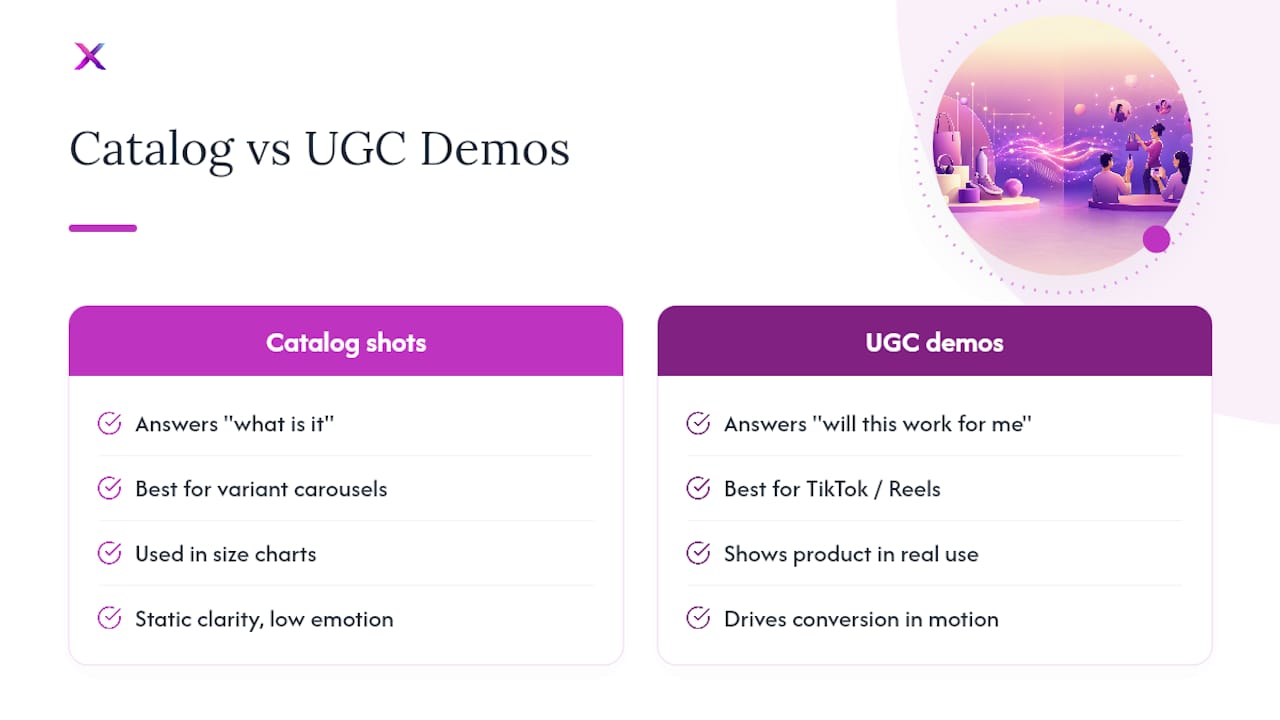
A clean, white-background product photo tells a buyer what something looks like. It doesn’t tell them what it’s like to own it. UGC-style demonstrations, someone actually using the product in a real setting, close that gap by giving buyers context and a sense of how the item fits their own life, which is why they consistently outperform plain catalog shots on social feeds.
The mechanism is simple: a catalog shot answers “what is it,” but a demo answers “will this work for me,” which is the actual question stalling most buyers at checkout. A UGC-style clip showing someone applying a skincare product, testing a phone case’s drop resistance, or packing a bag for a weekend trip removes friction a spec sheet never could.
That doesn’t mean catalog shots disappear entirely. They still earn a spot in variant-comparison carousels and size charts, where clarity beats emotion. But for TikTok and Reels specifically, demos and before/after reveals are the format doing the heaviest lifting for conversion, because they show practical value in motion rather than in a still frame.
If you’re not set up to film UGC content in-house, AI tools that generate demo-style video from existing product photos are worth exploring. You lose nothing on authenticity if the underlying claims still trace back to the real product page.
Balancing Facts and Fun Without Losing the Sale
A fact post that reads like a spec sheet gets scrolled past. A fact post that’s all personality and no substance gets likes without sales. The fix is treating every post as one fact, dressed in one hook.
Start with the fact (the spec, the benefit, the review line), then pick a hook that makes it feel human: a surprising comparison, a relatable problem, a bit of humor in the caption. The fact stays accurate. The delivery is what earns attention. “This mug holds 20 ounces” is a fact. “This mug fits an entire pot of coffee, no refills required” is the same fact with a reason to care.
Watch the ratio across a week rather than within a single post. If every caption reads like a lecture, engagement drops. If every caption is a joke with no real product information, followers grow but conversions stall. A useful rule: at least one clear, checkable fact in every post, and at least one moment of personality, humor, relatability, or a genuine surprise, somewhere in the caption or visual.
Comment sections are the fastest feedback loop you have. If a “fun” post gets comments asking basic product questions, that’s a sign the entertainment overshadowed the fact. If a “fact” post gets no engagement at all, it’s probably too dry to earn a share. Adjust the next post accordingly instead of guessing.
Adjusting Fact Posts for Different Buyer Segments
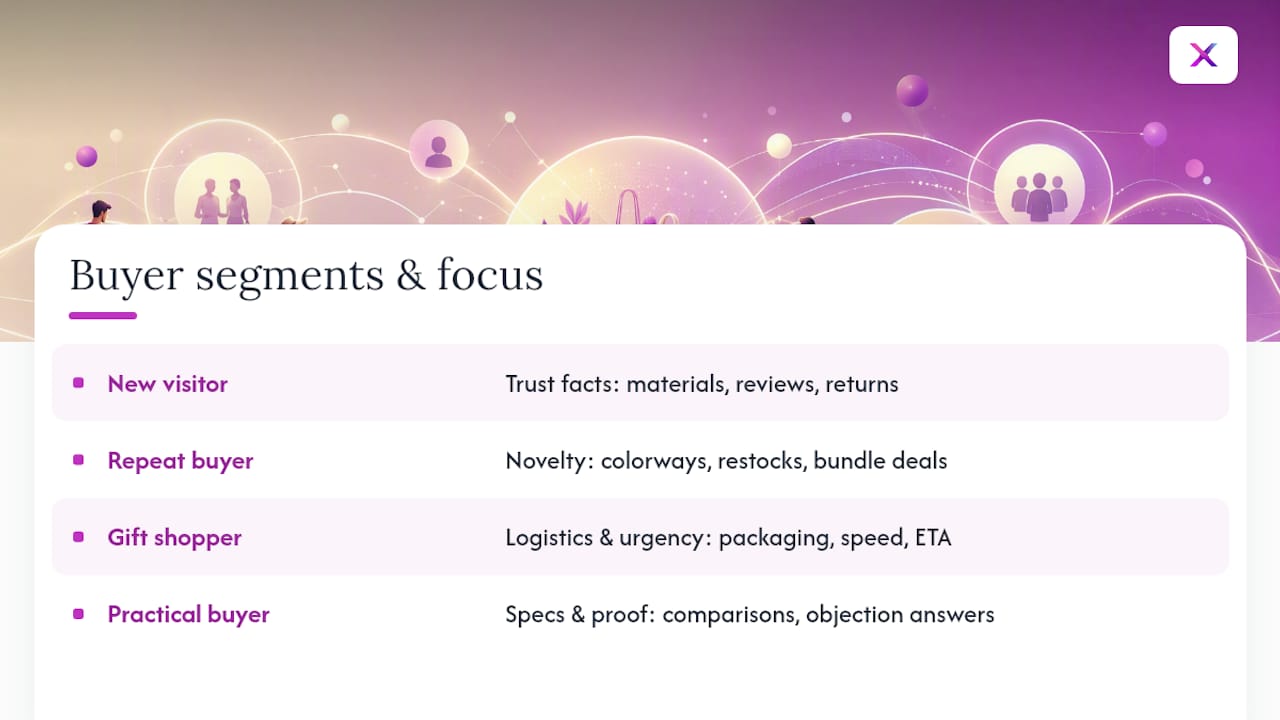
The same product fact needs a different frame depending on who’s scrolling. A first-time visitor to your Etsy shop needs trust-building facts (materials, reviews, return policy). A repeat customer already trusts you and wants novelty (new colorways, restocks, bundle deals).
Segment by intent, not just demographics. A gift shopper cares about packaging, shipping speed, and “will this arrive on time,” so your fact posts for that segment should lean on logistics facts and urgency CTAs. A practical buyer researching specs wants comparison carousels and objection-handling posts, not lifestyle b-roll.
Platform audience matters too. A TikTok audience skews toward discovery, so lead with a surprising fact or a demo hook before they know your brand. A Pinterest audience already searches with purchase intent, so evergreen how-to and spec facts perform better there than trend-driven hooks. An Instagram carousel audience tends to sit somewhere in between, useful for comparison and proof content that rewards a slower scroll.
If you sell multiple product lines, consider tagging your fact list by which segment each fact serves best: new-visitor trust facts, repeat-buyer novelty facts, and gift-shopper logistics facts. That way, when you’re building a week’s content, you’re not accidentally showing every buyer the same angle.
Scaling Fact Posts Without Losing Product Accuracy
The instinct to batch-produce fact posts with AI is the right one. Manually writing, filming, and scheduling 25 variations of a single product’s facts is not a sustainable weekly habit for a solo store owner. But speed only helps if the facts stay true to the live listing, and that’s where most automated workflows quietly break down.
A tool like this can convert a product listing into UGC-style videos, carousels, and slideshows and schedule them across networks automatically, which solves the production bottleneck. What it can’t do is know when you’ve quietly changed a spec, discontinued a color, or updated a return policy. That check stays a human job.
The workflow that actually works: a person labels the facts and buyer questions worth covering, AI generates the format variations, a person does a final proof pass against the live product page, then the batch goes out on a schedule. Skip the proof step and you risk advertising a claim that’s no longer accurate. Keep it, and you get the volume of automation with the reliability of a small, careful team.
— Toby
Turn This Into a Weekly Habit With Xyla AI
You’ve got the framework, but converting five product benefits into a week’s worth of demos, carousels, and captions by hand still eats hours you probably don’t have. This kind of AI platform is built to close that specific gap: feed it a product listing, and it generates UGC-style videos, carousels, and image sets automatically, then schedules them across Instagram, TikTok, Facebook, and Pinterest at the times your audience is actually active.

Where such AI social media tools differ from generic schedulers is that content generation is included in the standard plans rather than billed per credit, and they work directly from your catalog instead of remixing generic templates. That means the fact-to-post workflow in this guide (extract, map, produce, proof, schedule) becomes something you set up once and let run, rather than something you rebuild every Monday. If you’re running a Shopify store, the Starter plan starts at $29 a month, and Etsy sellers can check the Maker plan details here. For a full breakdown of every tier, view Xyla AI’s pricing page and estimate how many hours of content production you’d get back each week.
Sources
This guide draws on Shopify’s social copywriting framework, AttentionClaw’s product-to-social content system, and PostLinkApp’s 2026 e-commerce social data. For production help, see Xyla AI’s guides on creating UGC videos and writing captions and hashtags.
- Social media copywriting guidance — Shopify
- Turn product benefits into a week of social posts — AttentionClaw
- Social media marketing for e-commerce (2026) — PostLinkApp
FAQ
How many product facts do I need before starting?
Five is enough to build a full week of posts, and ten covers most stores through a month without repeating an angle. Pull them straight from your product’s benefits, specs, reviews, and FAQ section.
Which platform should I post fact posts on first?
Start with TikTok or Instagram Reels, since short-form video is currently the strongest format for product discovery. Add Pinterest once you have evergreen fact posts worth keeping in circulation for months.
How do I make sure a fact post stays accurate?
Check every claim against your live product page before it publishes, not just when you first write it. Set a recurring reminder to recheck posts anytime you update pricing, specs, or stock.
What should I track to know which fact posts drive sales?
Label each post with the fact and CTA it used (a spec, a benefit, a review), and tag its link with a matching UTM code so you can see which combination actually drives clicks or purchases. Watch saves and comments as an early signal before sales data catches up.


