

Save 8 Hours a Week: Ready Facebook Posts for Ecommerce
Four formats move product for e-commerce sellers on Facebook: short-form video with a tagged product, feed and carousel posts linked to your catalog, Group posts for repeat buyers, and Marketplace for local, high-intent shoppers. The common thread is a tagged product, not just a pretty photo. Automating the repurposing and scheduling of that content, the way Xyla AI does for Shopify, WooCommerce, and Etsy sellers, is what keeps the posting consistent enough to actually generate product clicks.
TL;DR:
- Posting 3 to 5 times weekly with a mix of Reels, feed, and Group content maximizes product clicks for small e-commerce stores.
- Reels are best suited for demonstrating motion products, while carousels and live sessions target higher-consideration items requiring customer questions.
- Automated content repurposing tools like Xyla AI can save roughly eight hours weekly by converting product listings into scheduled Facebook posts.
- Product tagging in posts depends on connecting your catalog via Commerce Manager, with manual uploads necessary for catalogs over a few dozen SKUs.
- The most cost-effective Facebook formats for conversions are Group posts for close audiences and Reels for broader discovery, with captions kept short and clear.
Table of Contents
- Your 7-Day Starter Checklist for Facebook Posts for Ecommerce
- Which Facebook Post Format Fits Which Product?
- Caption Templates and CTAs That Actually Convert
- Repurposing, Scheduling, and Automation Workflows
- Which Facebook Metrics Actually Predict Sales?
- Legal and Copyright Rules for Ecommerce Facebook Posts
- How to Run Facebook Ads Alongside Your Organic Posts
- What Actually Moves the Needle, and What Doesn’t
- Let Xyla AI Turn Your Product Listings Into Facebook Posts
- Sources
- FAQ
Your 7-Day Starter Checklist for Facebook Posts for Ecommerce
You don’t need a content calendar spreadsheet to get moving. You need five post ideas, a handful of assets, and three technical boxes checked before you publish anything.
Map your first week to where buyers actually are:
- Discover — a 15 second Reel showing the product solving a problem.
- Consider — a carousel comparing two or three SKUs, tagged individually.
- Buy — a restock or limited-stock post with a direct catalog tag.
- Trust — a reshared customer photo or video (UGC) with a short caption.
- Community — a Group-only post offering early access or a code.
Before you shoot anything, gather:
- One short demo clip (phone footage is fine).
- Three clean product photos, different angles.
- Any customer UGC you already have permission to use.
- Draft captions with a single, clear CTA in each.
Technical setup takes about 20 minutes and saves you weeks of manual tagging later. Connect your inventory to Commerce Manager so products can be tagged directly in posts, enable product tagging on your Page, and turn on automated replies in Page messaging for order questions. Small catalogs can be uploaded manually, but if you’re running more than a few dozen SKUs, a partner feed or CSV connector keeps everything synced without weekly manual updates.
Post 3 to 5 times a week if you’re a small store finding your footing, and reuse the angles that already perform once you know what they are, a cadence that holds up well for small e-commerce brands in 2026.
Which Facebook Post Format Fits Which Product?
Not every product belongs in the same format, and forcing a $15 impulse item and a $400 considered purchase into identical posts wastes both.
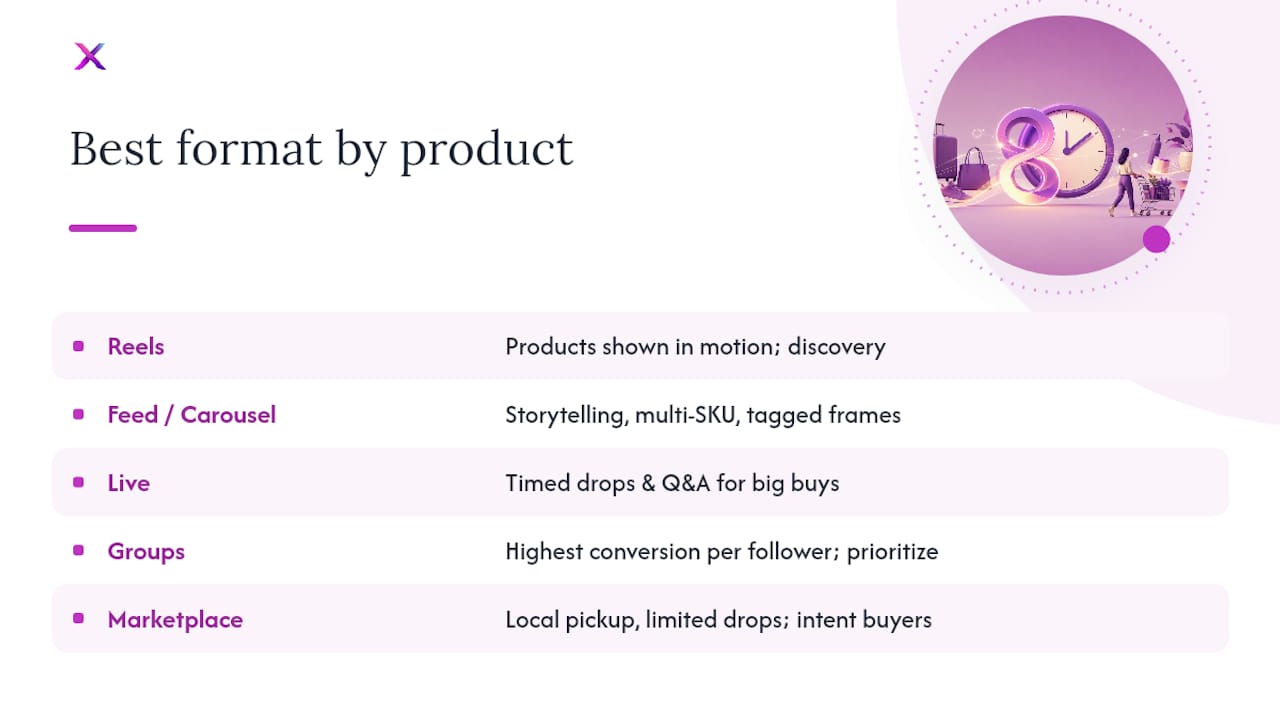
Reels work best for products you can demonstrate in motion: a skincare texture, a kitchen tool in use, a shoe on a foot. Tag the exact product shown, keep the CTA to one clear action (“Shop this now”), and don’t bury the payoff past the first three seconds. Short-form video is still the strongest discovery lever on the platform, and tagging inside the clip lets a viewer jump straight from footage to product page.
Feed posts and carousels suit storytelling and multi-SKU displays. A carousel showing a product in three colorways, each frame tagged separately, does more work than a single static photo ever will.
Live sessions fit timed drops and detailed Q&A, especially for higher-consideration items like furniture or electronics where buyers have real questions before they’ll commit.
Group posts consistently deliver the highest conversion rate per follower of any Facebook surface, because the audience already opted into a closer relationship with your brand. If you have even a small, active Group, prioritize it over chasing Reels reach.
Marketplace listings work for local pickup, limited drops, or clearing overstock to buyers who are already shopping with intent, not scrolling for entertainment.
Pro Tip: Match format to purchase complexity, not just product type. A $12 phone case can run entirely on Reels and feed posts; a $600 espresso machine needs Live or Group content where buyers can ask questions before they buy.
Caption Templates and CTAs That Actually Convert
Good captions follow a formula, not inspiration. Here are four that cover most e-commerce scenarios.
- Demo caption: “Watch this [product] handle [specific problem] in under 10 seconds. Tap to shop.” Pair with a tagged Reel.
- UGC reshare: “[Customer name] sent us this and we couldn’t not share it. Get yours below.” Tag the product, credit the customer.
- Restock/urgency: “Back in stock. Last time this sold out in [timeframe]. Grab yours before it’s gone again.”
- Founder story: “Here’s why we made [product] the way we did.” Short, personal, ends with a soft CTA rather than a hard sell.
Keep captions under three sentences for feed posts and Reels. One emoji per caption is plenty; more starts to read as spam. For thumbnails, pick the frame with the clearest view of the product, not the most dramatic moment.
On tagging and links: put the product tag directly on the image or video whenever the format supports it, since that’s the fastest path to a click. Reserve a pinned comment with a direct link for platforms or post types where native tagging isn’t available, or when you’re driving to a specific landing page rather than the general catalog.
If your store gets heavy comment volume, consider automating comment-to-order flows so a “link please” comment triggers an automatic reply with the product link instead of a manual scramble. Automate this once volume justifies it, not on day one when you still want to read every comment yourself.
Repurposing, Scheduling, and Automation Workflows
Content you already made for Instagram or TikTok doesn’t need to be reshot for Facebook. It needs to be trimmed, retimed, and reframed. A 9:16 TikTok clip usually needs the caption text repositioned so it doesn’t sit under Facebook’s UI, and a punchier first two seconds since Facebook’s audience skews slightly older and less patient with slow openers.
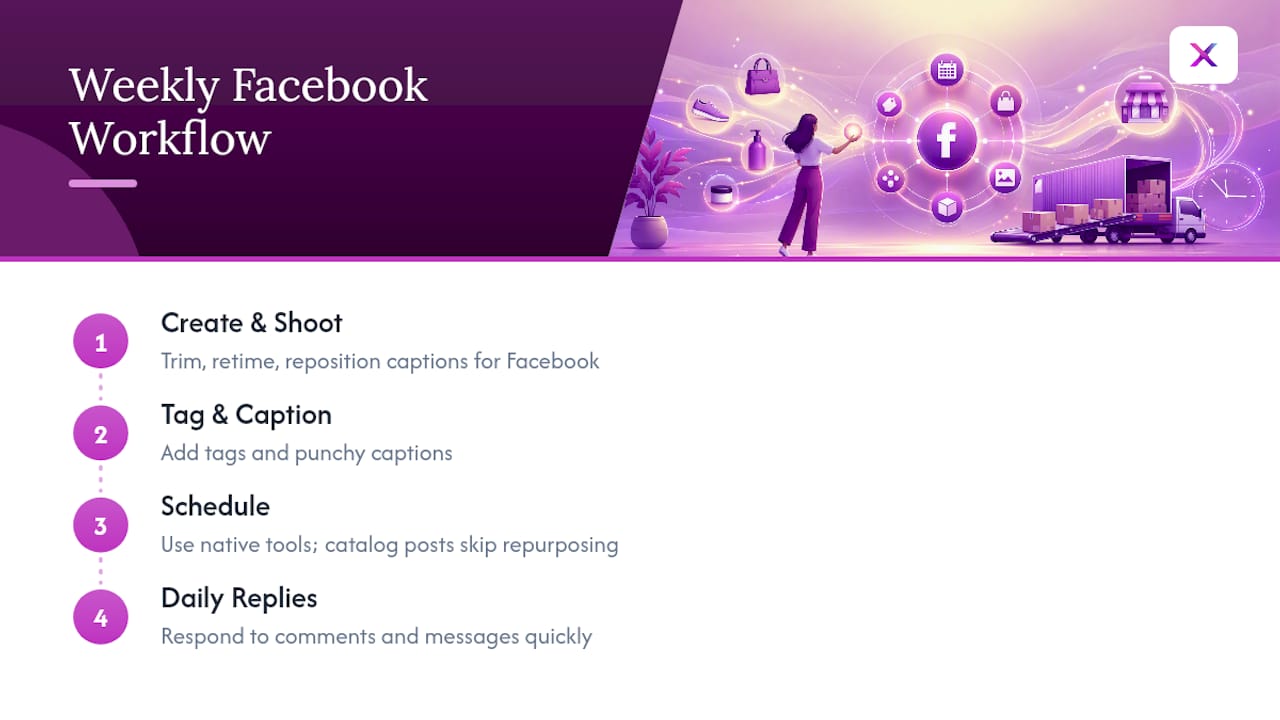
A simple weekly split keeps this from eating your whole week: one block for creating and shooting, one for tagging and captioning, one for scheduling, and daily time for responding to comments and messages. Native scheduling tools handle timing, but tools that generate posts directly from your product catalog cut out the manual repurposing step entirely, which is the actual time sink for most solo store owners.
Pro Tip: Never automate around a live shopping event or a customer service spike. Automation is for volume and consistency, not for the moments when a real, fast human reply is what closes the sale.
Which Facebook Metrics Actually Predict Sales?
Likes and comments feel good. They don’t pay the bills. The metrics that matter are product clicks, collection views, add-to-cart rate, and the conversion rate once that traffic lands on your website.
Run small tests instead of guessing:
- Swap CTA copy (“Shop now” vs. “Tap to see prices”) and compare click rate.
- Test two thumbnails on the same Reel content.
- Try a short caption against a longer one on the same product.
- Post the same content at two different times and compare product clicks.
Facebook Groups reportedly deliver the highest conversion per follower of any organic surface on the platform, which is worth weighing against their smaller reach. Review results weekly, not daily. If a format’s product clicks stay flat for two straight weeks, drop it and reallocate that time to whatever’s already converting.
Legal and Copyright Rules for Ecommerce Facebook Posts
Reposting someone else’s video, even a happy customer’s, without permission is a copyright risk regardless of how flattering the content is. Get explicit consent before reposting UGC, and keep a simple record of who granted it, whether that’s a comment, a DM, or a tagged post giving you the right to reshare.
Music is the most common trip point. Facebook’s built-in sound library is generally safe to use, but pulling audio from another platform’s trending clip and reposting it on Facebook can trigger a copyright claim or muted audio, killing the post’s performance.
Product claims matter just as much as media rights. Don’t post “clinically proven” or specific health and safety claims unless you can back them with real documentation, since misleading claims can draw both platform enforcement and regulatory attention depending on your product category. Sponsored content and paid partnerships need the branded content tag when money or free product has been exchanged, and pricing shown in a post needs to match what’s actually on your product page at that moment. A tagged product that leads to an out-of-stock or repriced item is a fast way to erode trust with a buyer who was ready to purchase.
How to Run Facebook Ads Alongside Your Organic Posts
Your best-performing organic post is almost always your best ad candidate, not a fresh creative built from scratch. Look at whichever Reel or feed post generated the most product clicks last month and boost that one first.
Once you’ve identified a winner, layer it into an Advantage+ Shopping Campaign rather than running a single static ad. These campaigns pull from your catalog automatically and test multiple creative variations against your existing organic content, which means the work you already did writing captions and tagging products doesn’t get thrown away when you move to paid.
Split your ad budget in a way that mirrors your funnel. Retarget people who clicked a product but didn’t buy with a tighter, more direct ad, while newer, colder audiences see the same demo-style content that performed organically. For higher-AOV products, consider expanding proven creative to other Meta placements instead of building separate ad-only content, since a creative that already earned organic engagement tends to carry lower cost-per-click once boosted.
Keep organic and paid on the same posting rhythm. If your organic Reels post three times a week, don’t let ads run stale creative for a month while organic content moves on to new angles. Refresh ad creative on roughly the same cycle as your organic calendar so the two channels reinforce rather than compete with each other.
What Actually Moves the Needle, and What Doesn’t
Most store owners overthink format and underthink consistency. A mediocre Reel posted every week beats a perfect one posted once a month, and I’d rather see a seller nail a repeatable workflow than chase whatever format is trending this quarter.
If your audience is new, lean into Reels for reach. If you already have repeat buyers, a Group will outperform almost anything else you post. Either way, the 30 day version of this is simple: pick three formats, post consistently, track product clicks weekly, and cut whatever isn’t earning its slot by day 30.
— Toby
Let Xyla AI Turn Your Product Listings Into Facebook Posts
Xyla AI is the alternative to hiring a social media manager for stores that don’t have eight spare hours a week to shoot, edit, caption, and schedule Facebook content. It pulls directly from your Shopify, WooCommerce, or Etsy listings and turns them into Reels, carousels, and product-tagged posts, then auto-publishes them to Facebook on a schedule built around when your audience actually buys.

That means the workflow this article just walked through, repurposing content, tagging products, keeping a consistent cadence, happens automatically instead of manually. Store owners using it get roughly eight hours back each week that used to go into content creation and scheduling.
If you run a Shopify store, the Shopify integration page shows how the catalog sync works, with available plans detailed on the pricing page. Etsy sellers can check the Etsy plans, starting at $29 a month with Maker. For a full look at every tier and plan details, visit the pricing page and start a free trial to see your first batch of posts generated from your own listings.
Sources
- How to build a profitable social commerce strategy in 2026
- Facebook Shops: Drive More Social Sales (2026) | Sprout Social
- Facebook Content Ideas for E-commerce Brands
FAQ
How Often Should Ecommerce Stores Post on Facebook?
Small stores get the best results posting 3 to 5 times a week, mixing Reels, feed posts, and occasional Group-only content. Consistency matters more than volume, since a sparse but reliable schedule beats sporadic bursts.
Do I Need a Facebook Shop to Tag Products in Posts?
Yes, product tagging requires your catalog to be connected through Commerce Manager, which turns your Page into a taggable storefront. Checkout for most stores now routes to your own website rather than happening natively on Facebook.
What’s the Fastest Way to Automate Facebook Posts for Ecommerce?
Tools that generate posts directly from your product catalog remove the manual repurposing step entirely. Xyla AI does this for Shopify, WooCommerce, and Etsy stores, turning listings into scheduled, tagged Facebook content, with plans starting at $29 a month on the pricing page.
Which Facebook Format Converts Best for Small Stores?
Group posts tend to deliver the highest conversion rate per follower of any organic Facebook surface. Reels drive the broadest discovery, so most stores need both rather than picking one.
Can I Repost Customer Videos on My Facebook Page?
Only with explicit permission from the customer, even if they tagged your brand publicly. Keep a simple record of that consent, and avoid pulling trending audio from other platforms since it can trigger a copyright claim once reposted.


