

2,200 vs 125: Instagram Caption Rules for Ecommerce Stores
Instagram captions can run up to 2,200 characters, but only the first roughly 125 characters show up in-feed before the “more” link cuts it off. That gap is the whole game: write your hook and call to action into that visible window first, then decide the rest of the length based on your format and goal. Everything past that is optimization, not obligation.
TL;DR:
- Most Instagram users see only the first 125 characters of a caption before it gets truncated, emphasizing the need to front-load hooks and calls to action.
- The total caption limit is 2,200 characters, which includes spaces, emojis, hashtags, and mentions, with emojis sometimes counting as multiple characters.
- Short captions under 150 characters are effective when the visual content communicates most of the message, while mid-length (300 to 500 characters) work best for engagement on regular posts.
- Longer captions are justified only for storytelling or detailed tutorials, with Reels favoring even shorter, punchier texts in the 125 to 220 character range.
- Using about 3 to 5 highly relevant hashtags and previewing caption length before posting can maximize visibility without cluttering the message.
Table of Contents
- What Counts Toward the Instagram Caption Character Limit
- Why Does Instagram Cut Off Your Caption at 125 Characters?
- How Long Should Instagram Captions Be by Format and Goal?
- How Do You Write a Caption That Actually Works?
- What’s the Fastest Way to Check Your Caption Length Before Posting?
- How Xyla AI Applies These Rules for E-Commerce Stores
- What Most Advice on Caption Length Gets Backwards
- Automate Caption Length and Format Rules With Xyla AI
- Sources
- FAQ
What Counts Toward the Instagram Caption Character Limit
The 2,200-character cap isn’t just body copy. It includes spaces, line breaks, emojis, hashtags, mentions, and any URLs you paste in, and Instagram stops accepting input the second you hit the ceiling with no warning banner beforehand, according to a breakdown of Instagram’s 2026 character limits. Other fields on the platform have their own separate caps:
- Caption: 2,200 characters
- Bio: 150 characters
- Direct message: 1,000 characters
- Username or display name: 30 characters
- Hashtags per post: 30 maximum
Emojis add a wrinkle most people never think about. Many emojis and special Unicode characters count as more than one character behind the scenes, so a caption that looks short on screen can quietly burn through your allowance faster than expected, per GrowthScribe’s character-count analysis. Stack 30 hashtags of average length onto that and you can eat 400 or more characters before you’ve said a single useful thing.
Why Does Instagram Cut Off Your Caption at 125 Characters?
Instagram truncates the visible caption in the feed at approximately 125 characters, then hides everything else behind a “more” link, according to Instagram’s own character-counting behavior. Most people scrolling never tap it. That means your hook, your value proposition, and ideally your call to action need to live inside that first sliver of text, not buried three paragraphs down.
Reels compress this even further. Because captions on Reels compete with on-screen UI elements like the like button and sound bar, the visible preview can run even shorter than 125 characters on mobile, per Replug’s 2026 character limit guide. A few openers that do the job in tight space:
- “3 mistakes killing your morning routine (fix #2 changed everything)”
- “We tested this for 30 days. Here’s what actually happened.”
- “This $12 tool replaced our entire skincare shelf.”
Pro Tip: If your caption needs more room than the visible window allows, drop a signpost like “Full steps below ⬇️” or “Details in the caption” right in that first 125 characters. It tells scrollers there’s a payoff worth tapping for.
How Long Should Instagram Captions Be by Format and Goal?
There’s no single ideal caption length. What works depends entirely on what you’re trying to get the reader to do, and the data backs up different ranges for different jobs.
Short captions, under 150 characters, work best when the image or video is doing all the talking and you just need a punchy line to sit alongside it. Practitioners commonly cite 138 to 150 characters as a sweet spot for staying fully visible without a “more” tap, treating it as a working convention rather than an Instagram-mandated number, per ShareThis’s caption best practices.
Mid-length captions in the 300 to 500 character range tend to give the most stable engagement across regular feed posts and carousels, based on a 2026 study on Instagram caption length and performance. That range gives you room for context, a bit of personality, and a clear ask without asking too much of the reader’s attention span.
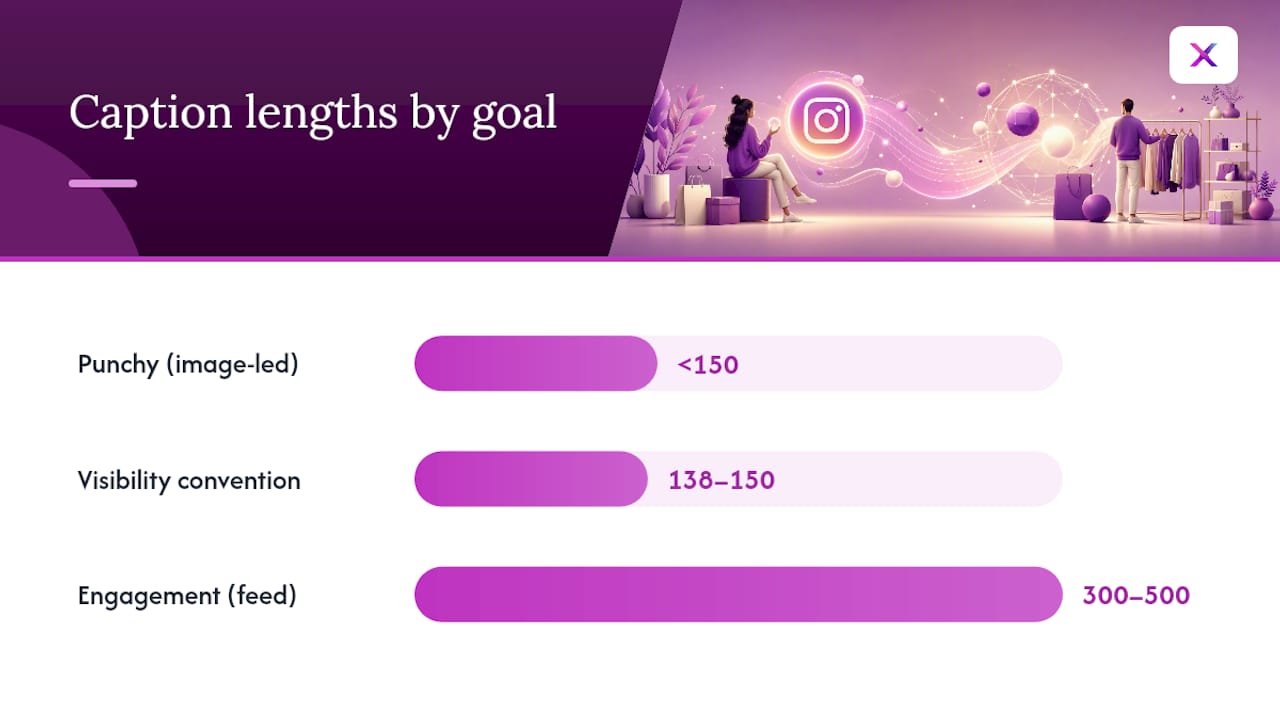
Storytelling captions can justify going past 500 characters, but only when the content earns it, think behind-the-scenes narratives, founder stories, or step-by-step tutorials people actually want to finish. Reels are the outlier: the same study found Reels frequently perform better with shorter captions, often in the 125 to 220 character range, because the video itself is the primary attention-getter.
Quick reference by intent:
- Engagement (likes, comments): 300 to 500 characters, conversational tone
- Saves and shares: 400 to 600 characters, list or step format
- Profile visits and link clicks: under 200 characters, clear single CTA
- Reels: 125 to 220 characters, front-loaded and punchy
Treat these as starting points, not rules carved in stone. Audience behavior varies by niche and by account size, so track your own saves, shares, and comment rates against caption length over a few weeks before locking in a formula.
How Do You Write a Caption That Actually Works?
A caption that performs isn’t luck. It follows a structure, and once you’ve written a few dozen, the pattern becomes automatic.
- Hook first. Your opening line, the part visible before truncation, needs to earn the tap. Ask a question, state a surprising number, or make a bold claim.
- Deliver context or value in the middle. This is where you explain the product, tell the story, or walk through the steps. Short paragraphs and deliberate line breaks keep this section from turning into a wall of text.
- Close with a CTA or engagement prompt. “Tap the link in bio,” “Tell us your favorite in the comments,” or “Save this for later” all work because they tell the reader exactly what to do next. Strong CTA writing techniques apply just as much to a caption as they do to an ad.
Formatting matters almost as much as the words themselves. Breaking a longer caption into short paragraphs with line breaks reduces drop off and keeps people reading after they tap “more,” according to Instagram caption formatting research. Emojis help guide the eye when used sparingly as visual breaks or bullet substitutes, but a caption drowning in them looks cluttered and eats into your character count faster than plain text.
On hashtags, less is often more. The trend has shifted toward using 3 to 5 highly relevant tags instead of maxing out the 30-tag allowance, since a wall of hashtags at the end of a caption crowds out real estate and dilutes reach toward your actual audience, per Sendible’s caption and hashtag guide. If you want to use more, drop the bulk of them into the first comment instead of the caption itself.
Longer captions earn their length when they teach something: a recipe, a tutorial, a “here’s exactly how we did it” breakdown. If you’re writing 500 plus characters, keep sentences short and give the reader a reason to stick around after the fold, whether that’s a numbered list, a surprising stat, or a mini cliffhanger.
What’s the Fastest Way to Check Your Caption Length Before Posting?
Instagram gives you zero warning as you approach 2,200 characters. It just stops accepting new text, so checking length before you hit publish saves you from chopping off your CTA mid-sentence.
The simplest options: draft in Instagram’s own app and watch the counter, paste into a free online character counter, or use the character count feature built into most notes apps and text editors. Whatever tool you use, make sure it counts Unicode properly. Emoji-heavy captions can hit the limit sooner than they look because of how those characters get encoded.
Before you post, run through a short checklist:
- Count total characters including spaces, emojis, and hashtags
- Confirm you’re at or under 30 hashtags
- Preview the first 125 characters on a phone screen to check the hook lands before truncation
Xyla AI’s caption and writing style guidance covers templates that build this checking into the drafting process itself.
How Xyla AI Applies These Rules for E-Commerce Stores
Store owners rarely have time to hand check character counts across dozens of product posts a week. Automated tools can generate captions with front-loaded hooks and format-specific lengths, shorter for Reels, mid-length for feed, scheduling them across networks. A typical workflow: a templated opening line per product category, paired with multi-format posts scheduled in a batch.
What Most Advice on Caption Length Gets Backwards
The advice you see most often treats caption length as a single number to hit: 138 characters, 300 characters, pick your favorite blog post. That framing misses the actual lever. The character count matters far less than what sits inside the first 125 characters, because that’s the only part of the caption most people ever read before deciding to scroll past.
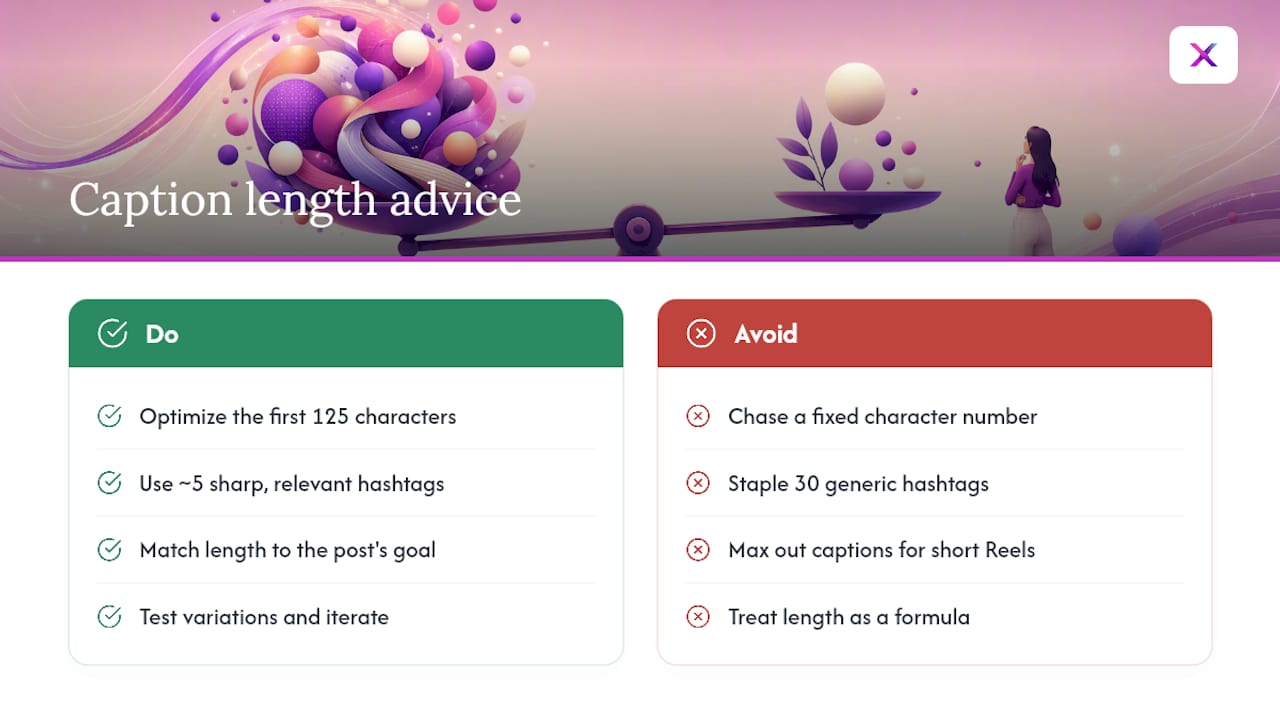
I’d also push back on the instinct to max out hashtags because Instagram allows 30. The data on reach doesn’t reward volume the way it did a few years ago, and a caption padded with tags looks like it’s trying too hard. Five sharp, relevant hashtags do more work than thirty generic ones stapled to the bottom.
If you take one thing from all this, it’s that caption length should follow your goal, not a formula. A Reels caption trying to hold attention for 15 seconds has no business running 500 characters. A tutorial post asking someone to save it for later probably needs more than a punchy one liner. Match the length to the job the caption is actually doing, then test.
— Toby
Automate Caption Length and Format Rules With Xyla AI
Getting caption length right on every single product post, across Instagram, TikTok, and Facebook, gets tedious fast when you’re running a store with dozens of SKUs. Automated tools can turn your product listings into captions with front-loaded hooks, apply the right length for each network’s format, and schedule posts automatically so you’re not manually counting characters before every post. You can still apply everything in this guide by hand if you’d rather write captions yourself. But if you’d rather see the automated version in action, Xyla AI’s step-by-step guide to automating your social media marketing walks through exactly how the process works from product listing to published post.
Sources
- Instagram Character Counter - Check caption length, DM …
- Instagram caption length study (2026)
- Instagram Caption Character Limit in 2026 (Full Breakdown)
FAQ
How long can my Instagram caption be?
Instagram allows up to 2,200 characters per caption, including spaces, line breaks, emojis, hashtags, and mentions. Once you hit that limit, the app simply stops accepting new text.
Does Instagram have a limit for captions?
Yes, the cap is 2,200 characters, and it applies the same way to feed posts and Reels. Instagram also caps hashtags at 30 per post and bios at 150 characters.
What is caption length in practical terms?
Caption length is the total character count of your caption text, but the number that actually matters for engagement is the visible portion, roughly the first 125 characters before Instagram truncates the rest behind a “more” link.
What is the 5-3-1 rule for Instagram?
Definitions of this rule vary across sources and it isn’t an official Instagram guideline, so treat any specific version you find online as a general content-mix suggestion rather than a fixed standard.
What’s the ideal caption length for engagement?
Mid-length captions between 300 and 500 characters tend to produce the most stable engagement on standard feed posts, while Reels often perform better with shorter captions in the 125 to 220 character range. Tools like Xyla AI can apply these ranges automatically based on the post format.


