

One 8–12 Minute Master, Five Sales Video Lengths Backed by Data
Cold outreach videos should run 30 to 60 seconds, email embeds and homepage clips 60 to 90 seconds, pricing and mid-funnel demos 2 to 4 minutes, full sales demos 3 to 5 minutes, and onboarding walkthroughs 5 to 10 minutes. Each range matches how much attention a viewer will actually give at that stage. Measure completion rate first, then adjust.
TL;DR:
- Cold outreach videos should stay under 60 seconds, with 65% of viewers completing the entire video, emphasizing short, punchy content.
- Pricing and mid-funnel demos perform best at 2 to 4 minutes, focusing on one workflow and measurable results to maintain viewer engagement.
- Longer videos like sales demos and onboarding should be between 3 to 10 minutes, broken into chapters when necessary, to suit different evaluator types.
- Analyzing actual viewer drop-off points and completing watch-time metrics helps refine ideal video length more effectively than relying solely on benchmarks.
Table of Contents
- What Is the Ideal Video Length for Sales at Each Funnel Stage?
- What to Show and How to Structure Sales Videos by Stage
- How Does Platform Choice Change the Ideal Runtime?
- Editing Tactics That Change How Long a Video “Feels”
- How Do You Test and Refine Your Video Length Over Time?
- Scaling It: One Master Recording, Many Channel-Ready Cuts
- What Actually Matters When You Sit Down to Edit
- How Xyla AI Helps You Produce the Right Cuts, Fast
- Sources
What Is the Ideal Video Length for Sales at Each Funnel Stage?
The runtime that works for a cold LinkedIn message will kill engagement on a pricing page, and a 10-minute onboarding walkthrough would be a disaster in someone’s inbox. Vidyard’s benchmarking found that most marketing videos perform best under two minutes, and first-touch outreach videos do best under 60 seconds. That single data point explains why so many cold sales videos fail: they run three or four times longer than the viewer’s actual patience.
Here’s the quick reference most teams need pinned above their editing timeline:
- Cold outreach (30 to 60 seconds): A stranger who has never heard of you gets the shortest leash. Front-load the payoff.
- Email embeds and ad clips (under 60 to 90 seconds): Inbox and feed attention spans are brutal. Say one thing well.
- Homepage and promo videos (60 to 90 seconds): Visitors are curious but not committed. Keep it tight.
- Pricing and mid-funnel demos (2 to 4 minutes): The viewer has intent now. You can show a workflow, not just a claim.
- Full sales demos (3 to 5 minutes): Wistia’s research puts sales demos in this window for evaluators comparing options.
- Onboarding and technical walkthroughs (5 to 10 minutes): Motivation is highest right after signup. Use the runway.
The statistic that should reshape how you brief your next video: viewers of sub-60-second outreach clips complete roughly 65% of the video, a completion rate most marketers would kill for at any length, highlighting the importance of visual content in marketing. Once you cross the two-minute mark without a clear reason (a demo request, a paid evaluation, a signed contract), completion drops fast. Length isn’t the enemy. Length without earned attention is.
On channel specifics: LinkedIn native uploads reward brevity in-feed, YouTube tolerates longer form because its algorithm favors watch-time, and email tools generally choke on anything past 90 seconds because most recipients are triaging, not settling in. Treat the channel as a constraint on the funnel stage, not a separate variable.
What to Show and How to Structure Sales Videos by Stage
Runtime is a container. What you put inside it determines whether the length actually works.
- Cold outreach (30 to 90 seconds). Open by naming the specific problem you noticed on their site, their job posting, or their product page. Spend 10 to 15 seconds hinting at the solution, not fully explaining it. Close with one clear ask: a reply, a calendar link, a specific next step. Vidyard’s research notes that once a prospect has replied or shown interest, you’ve earned the right to send a longer, two-minute-plus follow-up. The short version is a door opener, not the whole pitch.
- Mid-funnel and pricing pages (2 to 4 minutes). This is where a single, coherent workflow beats a feature tour. Pick one job the buyer cares about, walk it start to finish, and end on a measurable result: time saved, revenue recovered, error rate reduced. Wistia’s benchmarks place marketing demos in the 2 to 3 minute range for exactly this reason. A demo that tries to cover five features in three minutes convinces no one of anything.
- Sales demos and evaluative content (3 to 5 minutes, or longer with chapters). By this stage the viewer is comparing you against alternatives, not deciding whether they have a problem. One benchmark analysis puts the sweet spot for many product demos at 2 to 3 minutes, but full evaluation walkthroughs often run to 5 minutes when broken into labeled chapters covering setup, core use, and edge cases.
- Onboarding and technical walkthroughs (5 to 10 minutes). Motivation peaks right after a purchase or signup, which is the one moment a longer runtime pays off. Use it to remove friction, not to sell again.
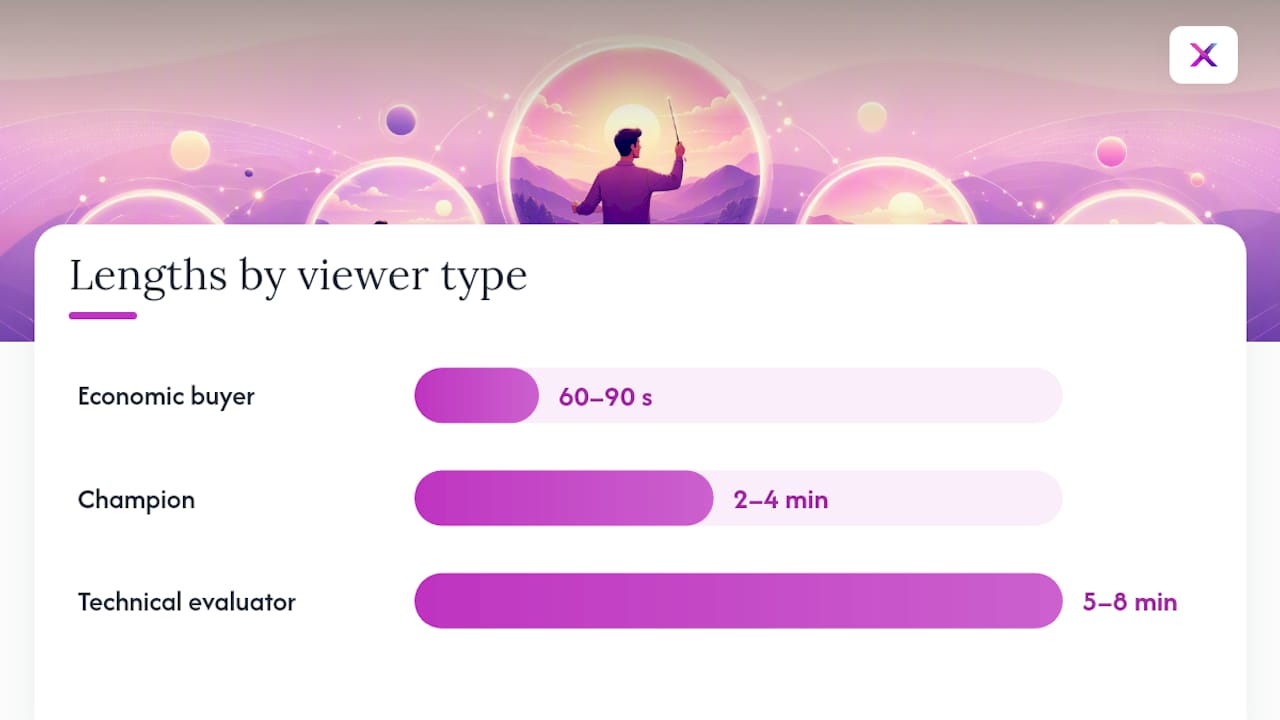
Here’s the piece most teams skip: mapping length to the person watching, not just the funnel stage. An economic buyer wants the 60 to 90 second version with the dollar outcome up top. A champion building an internal case needs the 2 to 4 minute version with enough proof to forward to their boss. A technical evaluator wants the 5 to 8 minute deep cut with the edge cases included, because a short demo can spark interest but rarely builds the conviction a technical stakeholder needs before signing off.
Pro Tip: Script the CTA before you script the hook. If you can’t state the one action you want in under 8 words, the video is too long before you’ve shot a frame.
How Does Platform Choice Change the Ideal Runtime?
Every platform runs on a different attention economy, and treating them identically is the fastest way to waste a good recording.
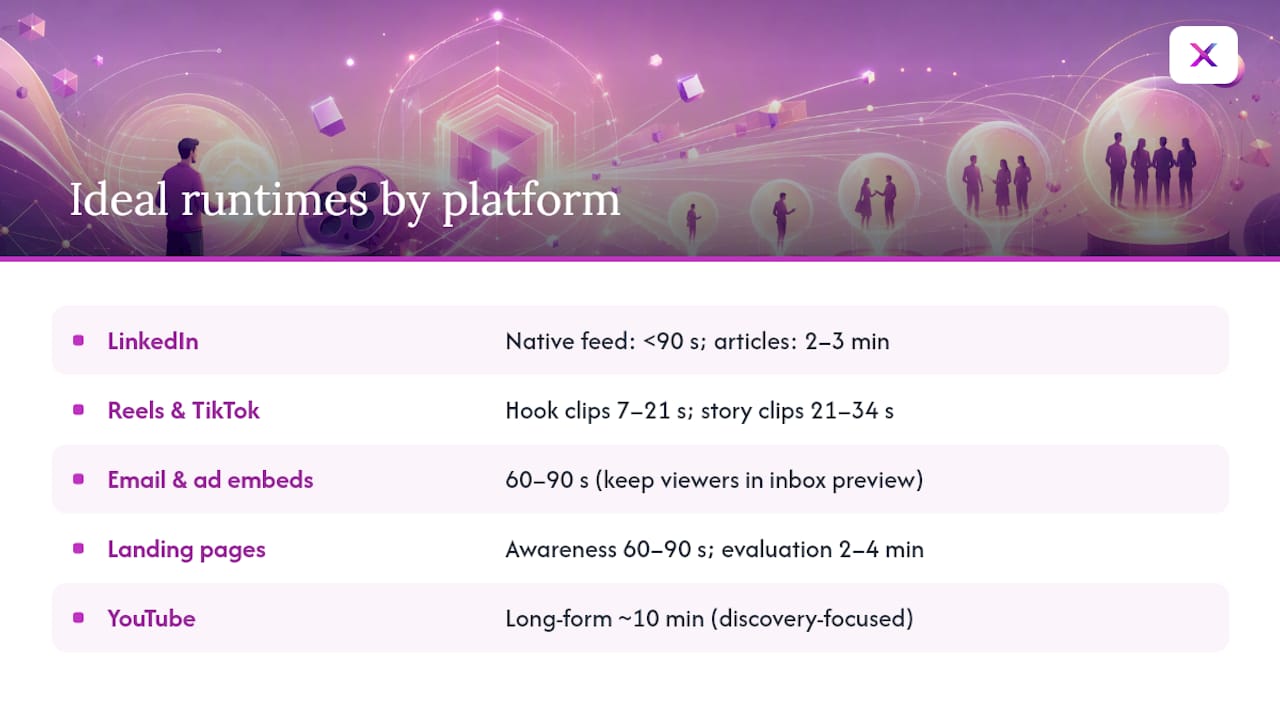
LinkedIn rewards a hook in the first two seconds because the feed algorithm and human scrolling both punish hesitation. Native feed uploads should stay under 90 seconds. Embedded thought-leadership pieces on a LinkedIn article or newsletter can stretch to 2 or 3 minutes, since that reader has already committed to reading.
Instagram Reels and TikTok live and die on the first fraction of a second. Pure hook-driven clips cluster at 7 to 21 seconds, while clips built around a small story or before/after arc extend to 21 to 34 seconds. Both formats optimize for loop and full-watch behavior, not for information density. If you’re repurposing a product demo for these formats, cut for the single most visual moment, not the most complete explanation. Xyla AI’s guide to growing an e-commerce store on social covers how to adapt longer product content for this exact behavior.
YouTube flips the incentive. The platform’s discovery algorithm favors longer watch-time for channel growth, so a 10-minute walkthrough can genuinely help you get found. But if the goal is a direct sale rather than subscriber growth, a short, conversion-focused upload embedded on a landing page still outperforms a long-form upload sitting in search results.
Email and ad embeds need to stay under 60 to 90 seconds almost without exception, since most recipients are deciding whether to keep watching within the first five seconds of an inbox preview. Landing pages are more forgiving: a page built for awareness supports a 60 to 90 second clip, while a page built for evaluation (a pricing or comparison page) can carry 2 to 4 minutes without losing the visitor.
The metric to watch differs by platform, too. Short-form success is completion rate: did they watch the whole 20 seconds? Long-form success is average watch-time as a percentage of total length, since almost nobody finishes a 10-minute video, and that’s expected.
Editing Tactics That Change How Long a Video “Feels”
Two videos can run the same length and perform completely differently. The gap is almost always pacing, not topic.
- Hook in 1.5 to 3 seconds. Reel-specific testing shows the first beat determines whether anyone sees second two. Test this moment specifically, not just the video as a whole.
- Cut every 2 to 3 seconds for short-form. A visual change roughly every couple of seconds keeps thumb-scrollers engaged; longer, uncut shots work fine for narrative-driven mid-funnel and demo content where the viewer has already opted in.
- Caption everything. Muted autoplay is the default viewing state across every major platform, and a video that only works with sound is a video most people will scroll past.
- Add chapters and on-screen timestamps for anything past three minutes. Longer demos succeed when viewers can jump to the section they care about instead of hunting through the whole runtime.
- Trim to the actual exit point, not a target number. If your analytics show most viewers drop at second 47, your real ideal length might be 45 seconds regardless of what a benchmark article recommends.
Pro Tip: Pull your last five sales videos into your analytics dashboard and plot the drop-off curve for each. If they all cliff at roughly the same second, that’s your platform’s real attention ceiling, not the number in any guide.
How Do You Test and Refine Your Video Length Over Time?
Benchmarks get you close. Your own analytics get you right.
- Track four numbers per video: completion rate, average watch-time, the specific second where drop-off spikes, and downstream conversions (replies, demo requests, sign-ups). Length recommendations mean nothing without conversion data attached.
- Apply a decision rule to what you see. If viewers consistently drop at a specific second, cut there. If completion is high but conversions are low, the video is too short to build a case, add a chapter with proof. If a long demo has strong completion, split it into a shorter teaser plus a longer deep-dive rather than assuming it needs to shrink.
- Run small, specific A/B tests. Try two different hooks on an identical 60-second video. Try a 60-second cut against a 120-second cut of the same demo. Try captions on versus off. Isolate one variable at a time or the result tells you nothing.
- Combine platform-native analytics with your own site’s video metrics. A LinkedIn view count says almost nothing about whether that viewer later watched your pricing-page demo. Pull both data sets together before deciding a length “worked.”
Trim-to-exit-point beats trim-to-target every time, because the exit point is where your actual audience told you the video overstayed its welcome.
Scaling It: One Master Recording, Many Channel-Ready Cuts
Shooting a separate video for every channel and funnel stage doesn’t scale for a small team, and it doesn’t need to. The more efficient path, backed by product-demo benchmark analysis, is recording one master demo at 8 to 12 minutes covering the full workflow, then cutting it into the lengths each stage actually needs.
- A 60 to 90 second cut for outreach and the homepage, pulled from the strongest single moment in the master recording.
- A 2 to 4 minute cut for pricing pages, built around the one workflow that matters most to a buyer at that stage.
- A 5 to 8 minute cut for full evaluations, with chapters added at the sections a technical buyer will want to jump between.
Automated captioning and format conversion (9:16 for Reels and TikTok, square for feed posts, landscape for YouTube and website embeds) turn one recording session into a full set of channel-ready assets without a second shoot. Xyla AI’s guide to creating videos and its social size and safe-zone reference walk through exactly this cutting and formatting process.
What Actually Matters When You Sit Down to Edit
The single rule worth remembering is that length is a symptom, not a strategy: match runtime to what the viewer already wants at that moment, then let your own drop-off data correct you. Three pitfalls sink most sales videos before length even becomes relevant: burying the ask past the 10 second mark in outreach clips, cramming every feature into a single mid-funnel video instead of picking one workflow, and shipping a “final” length without ever checking where real viewers actually quit watching. If you do only one thing this week, pull the watch-time report on your three most-viewed sales videos and find the second where the audience leaves. That number is worth more than any benchmark in this article.
— Toby
How Xyla AI Helps You Produce the Right Cuts, Fast
Cutting one master recording into five channel-ready versions by hand eats an afternoon most store owners don’t have. This software is built for exactly the workflow described in this article: it takes your product content, generates the shorter formats each platform needs, applies captions automatically, and posts each version to Instagram, TikTok, Facebook, and beyond at the times your audience is actually watching.

For a Shopify, WooCommerce, or Etsy store trying to run the master-recording-to-cuts strategy without hiring an editor, that’s the whole bottleneck removed. You upload or connect your product catalog, the software generates the reels, carousels, and short-form videos in the right aspect ratios, and it schedules them automatically across your channels. If you’re ready to see how the automation maps onto your own product lineup, see how the full process works step by step and start your trial from there.
Sources
- How Long Should a Video Be? Ideal Lengths for Every Channel
- How to Choose the Right Marketing Video Length for Any
- How Long Should a Demo Video Be in 2026? (Data-Backed) | Demosmith Blog


