

5 Automation Streams That Scale TikTok Shop Sales for Shopify Stores
Automate catalog sync and native-style content creation first. Connect Shopify to TikTok Shop, enable automated catalog sync, then run one product through an automated content workflow, using a tool to generate and schedule UGC-style videos, before touching affiliate management or fulfillment automation. Listings, content, creator workflows, order sync, and review flows are the five automations that actually move sales. Everything else is optimization.
TL;DR:
- Connecting Shopify to TikTok Shop for catalog and listing sync offers a quick, under-one-day, reliable way to keep inventory and pricing aligned.
- Generating TikTok-native videos from product photos can be automated easily once product quality is sufficient, but oversight ensures content remains engaging and trustworthy.
- Automating creator outreach and review requests boosts listing ranking and influencer participation, but review velocity must be established first.
- Fulfillment automation is crucial during viral spikes to meet shipping deadlines, prevent penalties, and avoid inventory shortages.
- Performance data analysis should focus on view-through rates, review growth, and ROAS to optimize content formats and creator partnerships effectively.
Table of Contents
- What to Automate First on TikTok Shop
- How Does TikTok Shop Automation Actually Work?
- Getting Shopify and TikTok Shop Connected Without Sync Errors
- Keeping Automated Content Native, Not Scripted
- Protecting Your Fulfillment When a Product Goes Viral
- Turning Performance Data Into an Automated Scaling Loop
- Xyla Maps Directly to All Five Automation Streams
- A Practitioner’s Note on What Automation Won’t Fix
- Sources
What to Automate First on TikTok Shop
Not every TikTok Shop task deserves automation on day one. Some save you hours immediately. Others only pay off once you have volume.
Here’s the order that actually works, ranked by payoff versus setup time:
- Catalog and listing sync — connects your Shopify inventory to TikTok Shop automatically, so pricing and stock never drift out of alignment. Quick win, live in under a day.
- Video and UGC content generation — turns product photos into TikTok-native clips without a film crew. Quick win once your product images are decent quality.
- Scheduled posting across accounts — removes the daily “did we post today” scramble. Quick win, immediate.
- Affiliate invite and commission tracking — recruits and pays creators without manual spreadsheet chasing. Medium-term project, worth it once you have consistent order volume.
- Post-purchase review requests — nudges buyers to leave reviews right after delivery, which directly affects listing ranking. Quick win.
- Order import and fulfillment sync — pushes TikTok orders into your existing shipping workflow. Longer setup, but it’s the one that prevents penalties.
Pro Tip: Don’t automate affiliate outreach before you have review velocity. Creators check your review count and rating before they’ll agree to post, so a thin listing kills your invite acceptance rate.
How Does TikTok Shop Automation Actually Work?
TikTok Shop automation isn’t one system. It’s five separate operational streams that need to talk to each other, and treating them as a single unit is what trips up most sellers.
- Listing sync. Your product feed maps fields (title, price, images, category attributes) from Shopify into TikTok’s catalog format. Sync tools handle the data plumbing, but they don’t generate the video content TikTok’s algorithm favors. That’s a separate job.
- Content pipeline. AI tools generate multiple video and image variants from your existing product photos, format them to each network’s specs, then queue them on a schedule. Human oversight still matters here. Someone needs to check that a hook isn’t stale or a claim isn’t misleading before it goes live.
- Creator and affiliate flow. This runs discovery (finding creators in your niche), invite, sample shipment, performance tracking, and commission payout as a connected sequence rather than five manual steps.
- Fulfillment and order routing. Orders import from TikTok Seller Center into your fulfillment system, get routed to a warehouse or 3PL, and shipping status pushes back to TikTok automatically to meet ship-by deadlines.
- Analytics feedback loop. The system captures view-through conversion and engagement signals, then applies rules to boost winning content and pull back on underperformers, a scaling method built on doubling down on what already works rather than guessing at the next video idea.
Each stream can run semi-independently, but the analytics loop only works if the other four are already feeding it clean data.
Getting Shopify and TikTok Shop Connected Without Sync Errors
Most catalog sync failures trace back to a handful of setup gaps, not a platform bug. Before you connect anything, confirm your store meets TikTok Shop’s eligibility requirements through Shopify’s sales channel.
- Verify your business location and upload the requested identity or business documents.
- Publish a return policy page. TikTok Shop checks for this before approving the channel.
- Enter a correct warehouse or fulfillment address. A mismatched address is the single most common cause of shipping sync failures.
- Clean up product data: consistent title formatting, accurate category attributes, and at least one video asset per listing (image-only listings underperform video listings on both ranking and conversion).
- Set shipping templates and fulfillment locations inside Shopify before you flip the channel live.
- Push one test order through the full pipeline, order import to tracking upload, before scaling.
If you’re running the Shopify integration, do this test with a low-volume SKU first. It surfaces mapping errors without risking a bestseller’s inventory count.
Keeping Automated Content Native, Not Scripted
TikTok Shop is discovery commerce, not a display ad network. Content that looks like a commercial gets scrolled past. Content that looks like a friend showing you something gets watched, and that distinction drives the entire platform’s ranking logic.
A few working rules for automated creative:
- Front-load the hook. The first three seconds decide whether someone keeps watching, so lead with the product doing its job, not a logo animation.
- Brief creators on product pillars and proof points, not word-for-word scripts. Creators know their audience’s language better than a template does.
- Generate multiple UGC-style variants per product rather than one polished master video. Variety in tone and pacing tests better than a single high-production clip.
- Resist over-editing. A slightly rough cut often reads as more trustworthy than a heavily produced one.
Creator partnerships work best as ongoing relationships, not one-off sample sends. Structuring commission tiers and sharing sales dashboards with your top creators improves retention far more than blasting free product to a hundred strangers. One of the most common failure patterns is sending samples with no follow-up plan, then wondering why nothing gets posted, a gap that automated follow-up sequences close easily.
Pro Tip: Automate the sample follow-up email or DM at day 3 and day 10 after shipment. Creators forget to post, not because they’re flaky, but because your product got buried under three other brand deals in their inbox.
For more tactical ideas on keeping content feeling organic at scale, see this rundown of ecommerce social media tactics.
Protecting Your Fulfillment When a Product Goes Viral
Fast shipping isn’t a nice-to-have on TikTok Shop. Sellers who hit ship-in-days targets earn visibility badges that directly influence ranking, and missing SLA windows repeatedly can trigger account-level penalties.
- Set reorder points at two to three times your normal threshold for any SKU actively running paid promotion or creator content, since viral spikes can blow through standard inventory buffers within hours.
- Route overflow orders to an elastic 3PL rather than relying only on in-house fulfillment during a spike.
- Automate order import so TikTok orders land in your fulfillment queue the moment they’re placed, not on a manual daily pull.
- Push tracking numbers back to TikTok Seller Center automatically, as manual tracking uploads can lead to late-shipment flags and penalties.
- Monitor your late-shipment rate weekly, not monthly. A slow leak becomes a suspended feature fast.
Turning Performance Data Into an Automated Scaling Loop
Track four numbers weekly: view-through conversion rate, review velocity, creator customer acquisition cost, and ROAS broken out by content format. These four tell you what to double down on and what to kill.
- Set a rule: if a video format’s ROAS beats your account average by a meaningful margin after a short learning window, automatically shift more budget and production toward that format.
- Run lightweight A/B tests on hooks rather than whole concepts. Small variable, faster read on what’s working.
- Pause creator relationships that produce views but no conversion after a fair trial period, and reinvest that budget into partners who are converting.
- Add QR codes or opt-in prompts to packing slips to capture buyers into owned email or SMS channels, so you’re not entirely dependent on TikTok’s algorithm for repeat purchases.
Review velocity in particular deserves a rule of its own. Listings with faster-growing review counts consistently outrank slower ones in the same category, which is exactly why post-purchase review automation belongs early in your setup, not as an afterthought once sales plateau.
Xyla Maps Directly to All Five Automation Streams
An AI tool is built for the operational problem this article just walked through: turning an e-commerce catalog into a steady stream of native-feeling TikTok content without hiring a video team.

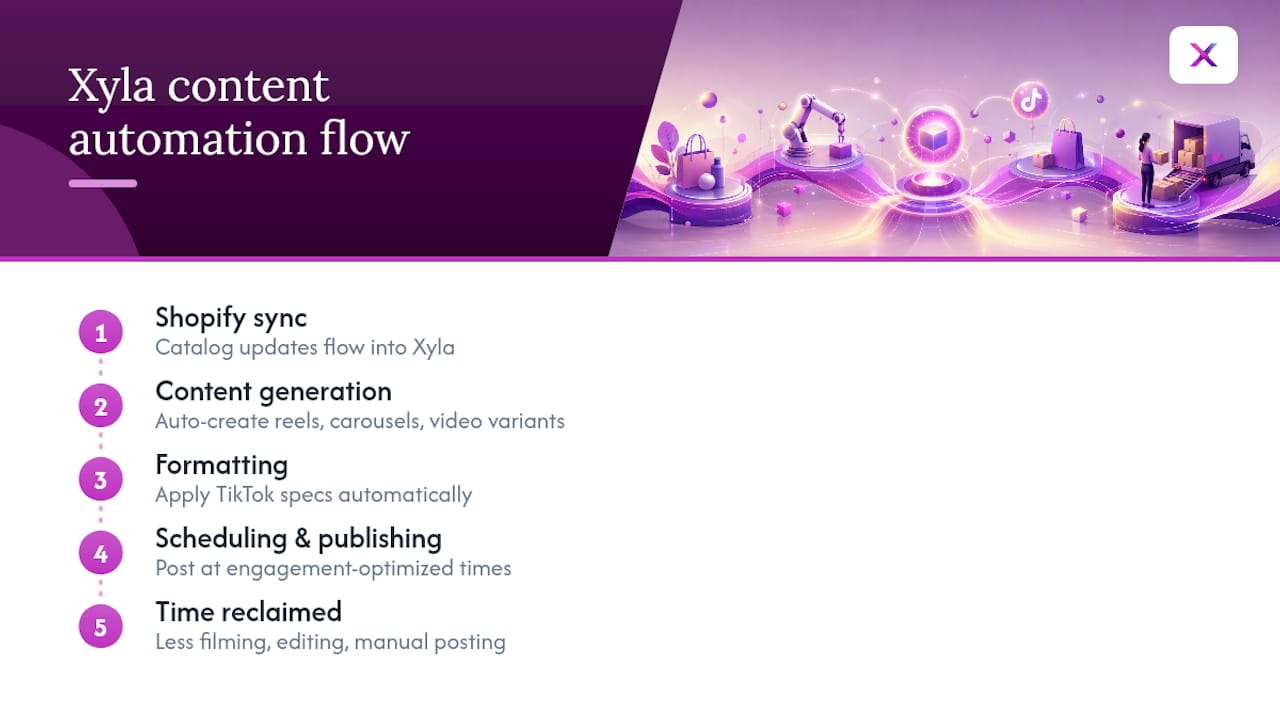
It handles the content pipeline stream end to end. Product listings get converted into reels, carousels, and video variants automatically, formatted for TikTok’s specs, then scheduled and published at times built for engagement. That connects directly to the listing stream through native Shopify integration, so a catalog update flows straight into new creative without a manual re-upload. Store owners who benefit most are the ones without a dedicated content person, who currently patch together social posting between order fulfillment and customer emails.
This isn’t a full replacement for creator relationships or fulfillment logistics. Xyla focuses on the content and scheduling layer, the part that eats the most weekly hours. Store owners typically reclaim significant time that used to go into filming, editing, and manually posting.
If your catalog sync is already live and you’re stuck on content, that’s the gap worth closing next. Start with the step-by-step automation guide to see how the setup works for your store.
A Practitioner’s Note on What Automation Won’t Fix
Automation removes the busywork. It won’t rescue a bad product photo, and it won’t make a creator relationship feel genuine if you’re only showing up when you need free content. Two things stay human no matter how good your tools get: judging whether a hook actually earns attention, and deciding which creators deserve a real partnership instead of a one-time sample.

Get those two calls right, and automation just multiplies the effort you were already putting in the right places.
— Toby
Sources
- How to Build a TikTok Shop Strategy That Actually Converts in 2026 – Ecommerce Times
- How to Scale on TikTok Shop: The 2026 Strategy Guide - Teikametrics
- Set up TikTok Shop — Shopify Help
- TikTok Shop Automation: What Actually Works for Sellers in 2026


