

Same Day Instagram Launch Playbook: Automation for Ecommerce Stores
Pin a conversion-focused carousel as your main announcement, publish a Reel for discovery, and turn on product tags before either goes live. That combination covers awareness and sales in the same 48 hours. Add countdown and reminder stickers a week out to build an opt-in list, then expect Reels to bring new eyes and carousels plus tags to close the sale.
TL;DR:
- Using countdown and reminder stickers during the pre-launch phase builds an opt-in audience and ensures timely awareness.
- A two-month planning window allows for securing influencer content, finalizing product tags, and creating a comprehensive content bank.
- Reels should be created during the same shoot as carousels to save time and ensure cohesive lighting and product angles across formats.
- Connecting your catalog before launch and tagging products on posts from day one boosts in-app conversion potential and reduces friction.
- Staff your DMs and comment replies during the first hours to capitalize on high purchase intent and turn early engagement into sales.
Table of Contents
- How to Plan an Instagram New Product Announcement (30 to 60 Day Checklist)
- Which Instagram Format Should You Use for Each Launch Stage?
- How Do You Make an Instagram Announcement Shoppable?
- How Should You Choose and Brief Influencers for a Launch?
- When Should You Run Instagram Ads for a Product Launch?
- What Should You Do on Product Launch Day?
- How Do You Measure Success After an Instagram Product Launch?
- What Do Social Media Experts Recommend for Instagram Launches?
- What I’ve Learned Running Product Launches on Instagram
- How Xyla AI Turns Your Launch Checklist Into a Same-Day Task
- Sources
- FAQ
How to Plan an Instagram New Product Announcement (30 to 60 Day Checklist)
A rushed launch usually means a rushed result. Giving yourself a a runway lasting about one to two months gives you time to line up influencer content, get product tags approved, and build a real content bank instead of scrambling the night before.
Start by picking one primary KPI, usually units sold or launch-week revenue, and one or two supporting metrics like reach or link clicks. Everything else on the calendar should serve that number.
- Days 60 to 45: Lock the launch date, brief influencers, and finalize the hero product photography and video.
- Days 45 to 30: Build your asset list: Reel footage, carousel slides, Story templates, and a highlight cover for the launch.
- Days 30 to 14: Set up product tags in Meta Commerce Manager, confirm catalog sync, and start seeding teaser content with countdown stickers.
- Days 14 to 3: Send influencers their content briefs and deadlines; schedule your launch-day post sequence.
- Days 3 to 0: Post daily reminder stickers, finalize DM reply scripts, and do a dry run of your bio link and shop tags.
Your asset list should include a small set of content such as a Reel, a carousel, multiple Story frames, and several influencer briefs. If you’re managing a Shopify, WooCommerce, or Etsy store, a tool that pulls directly from your product listings saves you from building every asset from scratch during an already busy month.
Which Instagram Format Should You Use for Each Launch Stage?
Every Instagram format plays a different role in a launch, and using the wrong one at the wrong stage is the most common reason announcements underperform. Social Media Examiner frames this as matching format to funnel stage: Stories for opt-ins, carousels for the announcement itself, Reels for reach.
Stories carry the pre-launch weight. Countdown stickers let followers opt in for a reminder alert, and reminder stickers notify them the moment your product goes live. Add a poll or a “which color?” question sticker to keep engagement two-way instead of one-way broadcasting, and pin a Story to a highlight so anyone who missed the countdown can still catch up days later.
Carousels are your main announcement post. A five-to-ten-slide carousel that opens with the product hero shot, walks through features, and ends on price and availability tends to hold attention longer than a single image, and it’s the format Social Media Examiner points to for the strongest average engagement on the feed.
Reels exist to reach people who don’t already follow you. A 15 to 30 second Reel showing the product in use, with a hook in the first two seconds, reaches non-followers far more effectively than a static post. Once it’s live, repurpose the same clip as a paid ad. It already performed organically, so you know the creative works before you spend a dollar on it.
Broadcast channels give you a direct line to your most engaged subscribers. Use them for the highest-visibility updates: “we’re live in one hour” or “we just sold out of the first color.” It’s a one-way channel, so keep messages short and time-sensitive rather than conversational.
- Stories: countdown stickers, reminder stickers, polls, Q&A
- Carousels: main announcement, feature walkthroughs, pricing
- Reels: discovery content, repurposed into ads
- Broadcast channels: direct high-urgency updates
Pro Tip: Record your Reel footage during the same shoot as your carousel slides. You’ll get matching lighting and product angles without booking a second session, and you’ll cut your content production time roughly in half.
How Do You Make an Instagram Announcement Shoppable?
Product tags remove the extra step between “I want this” and “I bought this,” and Instagram’s ecosystem increasingly rewards shoppable content with better distribution and conversion potential.
Setting it up requires a few steps done ahead of launch day, not the morning of:
- Connect your catalog through Meta Commerce Manager and confirm every new product syncs correctly before you post.
- Tag the product directly on your carousel and Reel posts once they’re published, not after they’ve already gained traction.
- If tags aren’t approved yet for your account or country, use a link sticker with a UTM parameter pointing to a landing page that mirrors the Instagram creative, so visitors don’t feel like they clicked into the wrong site.
- Put your CTA in three places: the first line of your caption, a sticker on your Story, and your bio link, so no single format is the only path to purchase.
- If you’re on Shopify, syncing your catalog directly through Shopify’s Instagram connection keeps tags accurate without manual updates every time inventory changes.
Setting up Instagram Shop before launch, not during it, means your first announcement post can carry tags from minute one instead of losing early buyers to friction.
How Should You Choose and Brief Influencers for a Launch?
Influencer choice depends more on fit than follower count. Micro and nano influencers often deliver stronger engagement and better niche alignment for e-commerce launches than a single macro name, and they typically cost less per post.
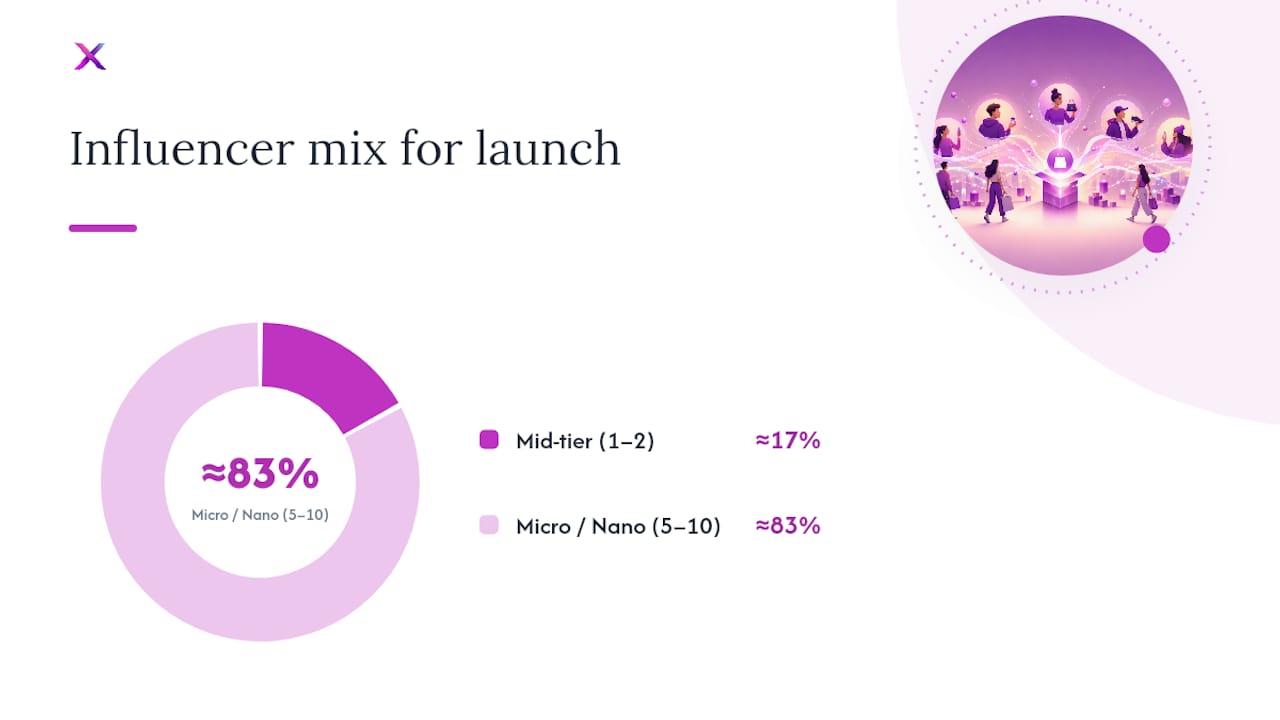
A useful split: one or two mid-tier influencers for reach, and five to ten micro or nano creators for authentic, niche-specific content you can reshare. Budget accordingly. Micro creators often work for product plus a modest fee, while mid-tier influencers require negotiated rates.
Your brief needs to cover more than just “post about our product.” Include these essentials:
- The launch date and exact posting window, with a buffer in case of platform delays.
- Key product details and one or two talking points you want mentioned, but leave room for their own voice.
- Usage rights: can you reshare their content on your grid, Stories, ads, and product pages, and for how long?
- Whether you want a specific format (Reel, carousel, Story) or you’re leaving format choice to them.
Once content comes in, move fast. Reshare it to your Story with a highlight tag, and where the platform allows it, add tagged posts directly to your profile grid without republishing, a workflow Instagram’s tagged-post grid feature now supports natively. That keeps your feed looking active with real creator content instead of just your own studio shots. For a deeper look at influencer selection criteria, this guide on influencer strategy breaks down vetting steps worth applying before you sign anyone.
Pro Tip: Ask every influencer for a raw, unedited clip in addition to their finished post. Raw footage is far easier to repurpose into UGC-style ads or product page video later.
When Should You Run Instagram Ads for a Product Launch?
Organic reach gets your launch started, but ads extend it to people who haven’t seen it yet or need a second nudge. The mistake most stores make is turning ads on too early, before they know which creative actually works.
Prioritize your audience in this order: retargeting first (people who’ve engaged with your account or visited your site in the last 30 to 90 days), then lookalikes built from existing customers, then broader interest targeting once you have data showing what converts.
For creative, run a genuine test rather than guessing:
- A/B test your organic Reel converted into an ad against your carousel converted into an ad. Whichever already performed organically usually outperforms as paid media too.
- Keep captions consistent across organic and paid versions so retargeted users recognize the product instead of seeing it as unfamiliar.
- Rotate in influencer or UGC clips as separate ad variants; they often outperform polished studio content for cold audiences.
What Should You Do on Product Launch Day?
Launch day succeeds or fails in the first several hours, not by the end of the week. Treat it as an operations problem, not just a content calendar entry.
- Update your bio link and pin your carousel announcement to the top of your grid before the first post goes live.
- Publish in sequence: carousel first, Reel within the hour, a Story sequence throughout the day, and a broadcast channel update the moment the product is actually purchasable.
- Staff your DMs and comments for several hours. Have scripted replies ready for the most common questions (sizing, shipping, restock timing) so responses go out in minutes, not hours.
- Watch for early customer posts and reshare them immediately to your Story. Companies that actively monitor and reshare UGC within the first six to twelve hours tend to convert more of the early, high-intent buyers who are still deciding.
- Run a quick creative check by early afternoon: if one format is clearly outperforming, shift your remaining scheduled posts to lean into it.
Pro Tip: Draft your DM reply scripts a full week before launch, not the morning of. You’ll think more clearly about tone and answer quality when you’re not also managing five other launch tasks at once.
How Do You Measure Success After an Instagram Product Launch?
Launch day is loud, but the numbers that matter show up over the following one to two weeks. Track a small set of KPIs consistently rather than chasing every metric your analytics dashboard offers.
Primary metrics to watch:
- Reach and saves tell you whether the Reel and carousel are actually finding new audiences and whether people intend to come back to the post later.
- Link clicks and product-tag taps show real purchase intent, not just passive scrolling.
- Product-tag conversions are the number that ties directly to revenue.
- Comments and shares are secondary but worth watching, since a spike often signals a piece of content worth turning into an ad.
For attribution, use UTM parameters on every link-in-bio and Story link so you can separate Instagram traffic from other channels in your analytics, and cross-check against your shop’s native analytics for product-tag click-through data.
Once you have a few days of data, run your optimization loop: A/B test caption length or CTA placement on your best-performing format, and only scale ad spend behind the version that’s already winning organically. Trying to fix an underperforming post with more budget rarely works as well as doubling down on the one already converting.
What Do Social Media Experts Recommend for Instagram Launches?
The tactical guidance across current Instagram-specific resources agrees on more than it disagrees on. Stories exist to build anticipation, carousels exist to convert, and Reels exist to reach people who’ve never heard of your brand. Social Media Examiner’s product launch framework treats these as sequential stages rather than interchangeable options, which is the mistake most brands make when they post everything in the same format out of habit.
Recommendation Source Why it matters Use countdown and reminder stickers pre-launch Social Media Examiner Builds an opt-in audience before you post Plan a runway lasting about one to two months The Shelf Gives time to secure influencer content and shop setup Enable product tags and shoppable posts Sked Social Improves in-app conversion potential Use tagged-post grid for creator content TechCrunch Shows collaborations without republishing contentInstagram’s newer tagged-post grid feature, along with editing tools like First Draft and audio replacement, changes the mechanics of Reel production and collaboration credit. Brands running multi-creator launches can now display influencer content on their own grid without re-uploading it, which keeps a feed looking active during a launch week without extra editing work.
What I’ve Learned Running Product Launches on Instagram
Most launch-day failures aren’t creative problems. They’re staffing problems. A brand spends three weeks perfecting a Reel and then has nobody watching DMs when the first fifty comments roll in asking about sizing or shipping. The content was never the bottleneck. The response time was.
Automation earns its keep here, not by replacing judgment but by removing the repetitive setup work: turning product photos into carousel slides, scheduling the sequence, generating caption variations. That’s what frees you to actually staff the comments section on launch day instead of still building assets at 11 p.m. the night before.
For a solo operator or a two-person team, the minimum viable launch kit is smaller than most guides suggest: one Reel, one carousel, five Story frames, and a highlight. Everything past that is a nice-to-have, not a requirement.
— Toby
How Xyla AI Turns Your Launch Checklist Into a Same-Day Task
Every step in this playbook, carousel slides, Reel footage, product tags, scheduled posting, takes hours to build by hand for each new product. This tool is designed for e-commerce stores on platforms like Shopify, WooCommerce, and Etsy, and it converts product listings into carousels, Reels, and video content, then customizes and schedules posts for Instagram, TikTok, and Facebook automatically.

Instead of spending a Sunday afternoon building your launch Reel and carousel from scratch, you feed in the product listing and Xyla AI generates the visual assets across formats, cutting the manual production time that usually eats into your launch week. Store owners often save significant time that would otherwise go into manual content creation and posting. When connected to Instagram Shop, the automated workflow can maintain product tags and syncing without needing extra setup on launch day.
See exactly how the automation fits your workflow in this step-by-step guide to automating your social media marketing, and start your next launch with the heavy lifting already done.
Sources
For readers who want to go deeper on any tactic covered here, these are the sources this playbook draws from:
- How to Launch Your Next Product on Instagram • Social Media Examiner
- Launch a Product on Instagram • The Shelf Influencer Marketing
- How to launch and market a new product on Instagram | Sked Social
- Instagram’s latest feature lets you add tagged posts to your profile grid | TechCrunch
For implementation, Xyla AI’s ecommerce social media tips page covers additional formats worth testing beyond launch week.
FAQ
How do I announce a new product on social media?
Pin a carousel as your main announcement, publish a Reel for reach, enable product tags for conversion, and build anticipation beforehand with Story countdown and reminder stickers.
What new products are being released today?
That varies by brand and category; Instagram doesn’t run a centralized new-product feed, which is exactly why a strong announcement strategy on your own account matters more than hoping for organic platform visibility.
What’s new in Instagram’s latest update?
Instagram recently added a tagged-post grid feature along with editing tools like First Draft and audio replacement, letting brands display creator collaborations on their own grid without republishing content.
What is that new thing on Instagram everyone’s talking about?
If it relates to product launches, it’s most likely the tagged-post grid update or expanded shopping features. Both directly affect how brands plan and execute announcements.
How long should a product launch campaign run on Instagram?
A a runway lasting about one to two months works for most e-commerce launches, giving enough time for influencer content, shop setup, and pre-launch teasing without losing momentum from too long a wait.


