

Save 8 Hours a Week: Facebook Auto Posting for Small Ecommerce
The fastest, safest ways to auto post to Facebook fall into three camps: native scheduling through Meta Business Suite, Graph API schedulers connected via Meta OAuth, and browser or extension tools for group posting where the API doesn’t reach. For most small businesses, the right default is native scheduling or an API based tool paired with a quick human review before anything publishes. Skip mass identical posting into groups. Facebook’s rate limits and spam detection treat that pattern as potential abuse rather than legitimate marketing.
TL;DR:
- Use Meta Business Suite or Graph API schedulers for most reliable auto-posting, avoiding browser-based tools that depend on active sessions.
- Always run test posts before scheduling large campaigns to verify formatting, image cropping, and link previews.
- Segment and vary group outreach posts, respecting group rules and avoiding identical promos that appear spammy and risk bans.
- Prioritize native Facebook Reels uploads over cross-posted Instagram Reels to maximize organic reach and discovery potential.
- Implement a human review step for AI-generated content to prevent repetitive phrasing, misinformation, or violations of community standards.
Table of Contents
- Facebook Auto Posting Methods Compared
- How Do You Connect Facebook Through Meta Business Suite?
- Are Third-Party Schedulers Safe for Auto Posting to Facebook?
- Can You Auto Post to Facebook Groups the Same Way as Pages?
- Facebook Reels vs Instagram Reels: What Changes for Auto-Posting?
- Building a Content Calendar That Doesn’t Feel Robotic
- How Should Small Businesses Combine AI Content With Human Review?
- Avoiding Rate Limits and Fixing Common Posting Failures
- What Permissions Should You Actually Grant an Auto-Posting Tool?
- Cross-Posting to Instagram, TikTok, and Beyond Without Duplicate Content
- Staying Inside Facebook’s Content and Community Guidelines
- Why Xyla AI Leans Into Human-in-the-Loop Automation
- Automate Facebook Posting Without Losing Your Product Focus
- Where to Learn More About Facebook Auto Posting
- Sources
Facebook Auto Posting Methods Compared
Before you pick a tool, it helps to know what each category actually does under the hood, because that determines what breaks and when.
- Native scheduling (Meta Business Suite): Built by Meta, free, publishes directly to your Page through the same permissions system you already use to log in. Pro: zero third-party risk. Con: limited bulk upload and no cross-platform automation beyond Meta’s own apps.
- Graph API schedulers (third-party tools): Connect through Meta OAuth and publish in the background without needing a browser open. Pro: reliable, scalable, works while your laptop is closed. Con: setup takes longer and some tools charge per connected Page.
- Integration/automation platforms: Chain Facebook posting to other triggers, like a new product listing or an email campaign. Pro: good for e-commerce workflows that need posting tied to inventory changes. Con: more moving parts means more places for a broken connection to hide.
- Browser extensions for group posting: Simulate a human clicking “post” because Facebook’s API doesn’t allow automated posting into most Groups. Pro: only real option for group outreach at scale. Con: fragile, against the spirit of Facebook’s terms if pushed too hard, and the first thing to break after a Facebook update.
If you’re managing multiple Pages, want AI-generated content, or need Reels turned around fast, a Graph API scheduler earns its cost. Group outreach is its own animal entirely, and it deserves its own section further down because the rules are genuinely different there.
How Do You Connect Facebook Through Meta Business Suite?
Native scheduling remains the most dependable starting point precisely because Meta built it, controls it, and won’t suddenly block it in a policy update the way it sometimes does to outside tools.
- Connect via Meta OAuth. Log into Meta Business Suite, link your Facebook Page, and confirm the permission scopes it requests. Meta’s own scheduling help page walks through the exact OAuth flow and what each permission unlocks, including posting, insights access, and comment moderation.
- Compose your post types. Meta Business Suite supports photos, links, text updates, carousels, and video, including Reels. Note that some formatting options (like polls or certain interactive stickers) are still mobile-app only, so check before you build a whole campaign around a feature that won’t render on desktop scheduling.
- Drop it into the content calendar and set the date. Once scheduled, posts sit in an editable queue. You can reschedule, swap the image, rewrite the caption, or delete it entirely before it goes live, and you can add collaborators who need to approve a post before it publishes.
Reels behave a little differently inside this workflow. Uploading a short vertical video through Meta Business Suite gets it treated as a Reel automatically, which matters for reach (more on that later). But autopublish for Reels sometimes lags behind autopublish for standard video, so test with a low-stakes post first rather than trusting a big product launch to a feature still finding its footing.
Pro Tip: Before you switch on full autopublish for a week’s worth of posts, schedule just one and let it go live unattended. Confirm the link preview, image crop, and tagged product all rendered the way you expected. A five-minute test beats an afternoon rewriting a week of scheduled posts.
Are Third-Party Schedulers Safe for Auto Posting to Facebook?
Yes, when they publish through the Graph API rather than simulating clicks in a browser. That distinction is the single most important thing to check before connecting any auto posting tool to your Page.
API-based tools authenticate through the same Meta OAuth system as native scheduling, which means they publish directly to Meta’s servers in the background. Your laptop can be off, your browser closed, and the post still goes out on schedule. Browser-automation tools, by contrast, need an active session and tend to break the moment Facebook tweaks its interface, which happens often enough to be a real maintenance headache.
A checklist worth running before you commit to any scheduler:
- Does it support bulk upload from a spreadsheet or CSV, or are you stuck adding posts one at a time?
- Is there an approval workflow, so a draft sits for review before it auto-publishes?
- Can you see analytics inside the tool, or do you need to jump back into Meta Business Suite for every performance check?
- Does it support native video and Reels upload, or does it just push a link?
Setup generally follows the same shape regardless of vendor: connect your Page through OAuth, choose whether posts auto-publish or wait for approval, and set your posting window and cadence (say, three posts a week between 10 AM and 2 PM) using an automated publishing platform. Platforms like Xyla AI’s automation workflow build the human review step directly into that queue so nothing goes out unchecked.
Before flipping on full auto-publish, run two or three test posts and confirm they land correctly, then double-check the permissions you granted actually match what you intended. It’s easy to accidentally grant a tool access to comment moderation when all you wanted was posting rights.
Pro Tip: Revoke access for any scheduler you’ve stopped using. Old connected apps with live tokens are a quiet security risk, and Meta’s permissions dashboard makes cleanup a two-minute job.
Can You Auto Post to Facebook Groups the Same Way as Pages?
No, and treating them the same is the most common mistake small businesses make with Facebook auto posting.
Pages publish through the Graph API cleanly because a Page is a business entity Meta expects to post programmatically. Groups are different. Meta restricts automated posting into most Groups, which means a lot of “auto post to Facebook groups” tools rely on browser automation that logs in as a real member and clicks post the way a human would. That approach works, but it sits closer to the edge of what Facebook tolerates, and it depends on you actually being an accepted member of each group first.
Group culture also punishes exactly what makes automation efficient: sameness. A single identical promotional post blasted into fifteen groups reads as spam to both the platform’s detection systems and the humans moderating those communities. If you’re going to automate group outreach at all, do it carefully.
- Segment your group list by audience type rather than treating every group the same. A post that fits a local buy-sell-trade group won’t fit a niche hobbyist community.
- Vary the copy for each group, even slightly. Swap the opening line, change which product you lead with, or adjust the tone to match that group’s norms.
- Randomize your posting intervals rather than firing off ten posts in the same minute. Practitioners who automate group outreach typically stagger timing and rotate phrasing to keep each post looking contextual rather than copy-pasted.
- Read the group rules pinned at the top before automating anything into it. Plenty of groups explicitly ban promotional posts or restrict them to a designated day.
If a group post fails to publish, check three things first: whether you’re still an active member, whether the group’s admin settings changed to require post approval, and whether your account has been temporarily restricted from posting there after a prior flag.
Facebook Reels vs Instagram Reels: What Changes for Auto-Posting?
Reels get treated differently than standard video the moment you upload them, and that difference is worth understanding before you schedule one.
Facebook now treats uploaded short-form vertical video as a Reel automatically, and Reels get prioritized in Facebook’s discovery feed in a way regular video posts don’t. That means a Reel can reach people who have never followed your Page, which is a meaningfully bigger opportunity than a standard link post that mostly reaches existing followers.
- Don’t just cross-post your Instagram Reel and call it done. Cross-posting from Instagram to Facebook can limit native engagement, because Facebook’s algorithm and comment system don’t fully credit content that was clearly published elsewhere first.
- Upload natively to Facebook when reach matters more than convenience. The extra five minutes of re-uploading usually pays for itself in discovery.
- Keep captions punchy and front-load the hook. Reels get judged in the first two seconds; a slow opening loses viewers before your product even appears on screen.
- Test cadence rather than guessing. Facebook’s shift toward prioritizing Reels for discovery means posting frequency that worked for standard posts a year ago may be too sparse now.
Reels get a real distribution edge. Facebook Reels can surface to non-followers at rates standard posts rarely match, which is exactly why treating them as an afterthought in your auto-posting queue leaves reach on the table.
Building a Content Calendar That Doesn’t Feel Robotic
A calendar only works if it’s built around actual content variety, not just filled with dates.
Start by mapping post types across the week rather than posting the same format every day. A simple rhythm might look like a product feature on Monday, a customer-facing tip or how-to on Wednesday, and a Reel or behind-the-scenes clip on Friday. Label each entry in your calendar by campaign so you can tell at a glance whether you’re overloading one theme and neglecting another.
For bulk scheduling, a spreadsheet with columns for post copy, media file name, target date, and platform works better than trying to remember what you meant three weeks ago. Keep your media assets in dated folders that match your spreadsheet rows exactly. It sounds tedious, but it saves real time the moment you need to swap one asset for another at the last minute.
- Use recurring posts sparingly. A weekly “shop our bestsellers” slot works fine as a recurring template, but rotate the actual product and image each time so followers don’t tune it out.
- Watch your engagement numbers weekly, not monthly. If a Tuesday slot consistently underperforms, move it. Cadence should follow data, not habit.
- Batch a month at once, then adjust week by week. Planning everything at once saves time; refusing to adjust it wastes the data you’re collecting.
Pro Tip: Build one week of “evergreen” posts you can always fall back on when you’re short on new product content. Xyla AI’s content calendar makes it easy to slot these in automatically without leaving gaps in your schedule.
How Should Small Businesses Combine AI Content With Human Review?
The workflow that actually holds up under real use looks like this: AI drafts the post, it lands in a calendar queue, a human skims and edits it, and only then does it publish, or auto-approves if it’s a low-risk, evergreen post type you’ve already vetted.
Practitioners working with AI-generated social content consistently recommend this kind of human-in-the-loop review rather than full autopilot, because AI drafting without guardrails tends to repeat structures and phrasing across dozens of posts. A few controls make the difference:
- A written brand voice guide the AI drafts against, even a short one, cuts down on generic-sounding copy.
- Template rotation rules so the AI isn’t defaulting to the same sentence structure for every product.
- A required-edit threshold for certain post types, like anything mentioning pricing or promotions, where a human eye catches errors before they go live.
- Full autopublish reserved for low-risk content, such as evergreen tips or restocked-item alerts that don’t carry promotional claims.
The benefits of AI social media marketing show up most clearly for stores that don’t have a dedicated marketing hire. AI can turn a product photo into a scheduled post in minutes instead of the half hour it might otherwise take to write copy, size images, and pick a caption.
Avoiding Rate Limits and Fixing Common Posting Failures
Most auto-posting failures trace back to one of three causes, and checking them in order usually finds the problem fast.
- Expired or revoked tokens. If a scheduled post silently fails, reauthorize the connected app first; Meta’s own guidance flags token expiration as the most common cause of failed scheduled publishing.
- Media format mismatches. Facebook rejects certain aspect ratios or file sizes for Reels versus standard video, so check the format before assuming the tool itself is broken.
- Permissions that quietly changed. If a Page admin role changed or a collaborator lost access, scheduled posts tied to that account can stop publishing without an obvious error message.
Keep posting intervals conservative rather than aggressive, especially if you’re using any browser-extension tool. Avoid identical content across multiple destinations, and before contacting support, gather your post’s timestamp, the error message if one appeared, and which tool or integration was responsible. That context turns a vague support ticket into a five-minute fix.
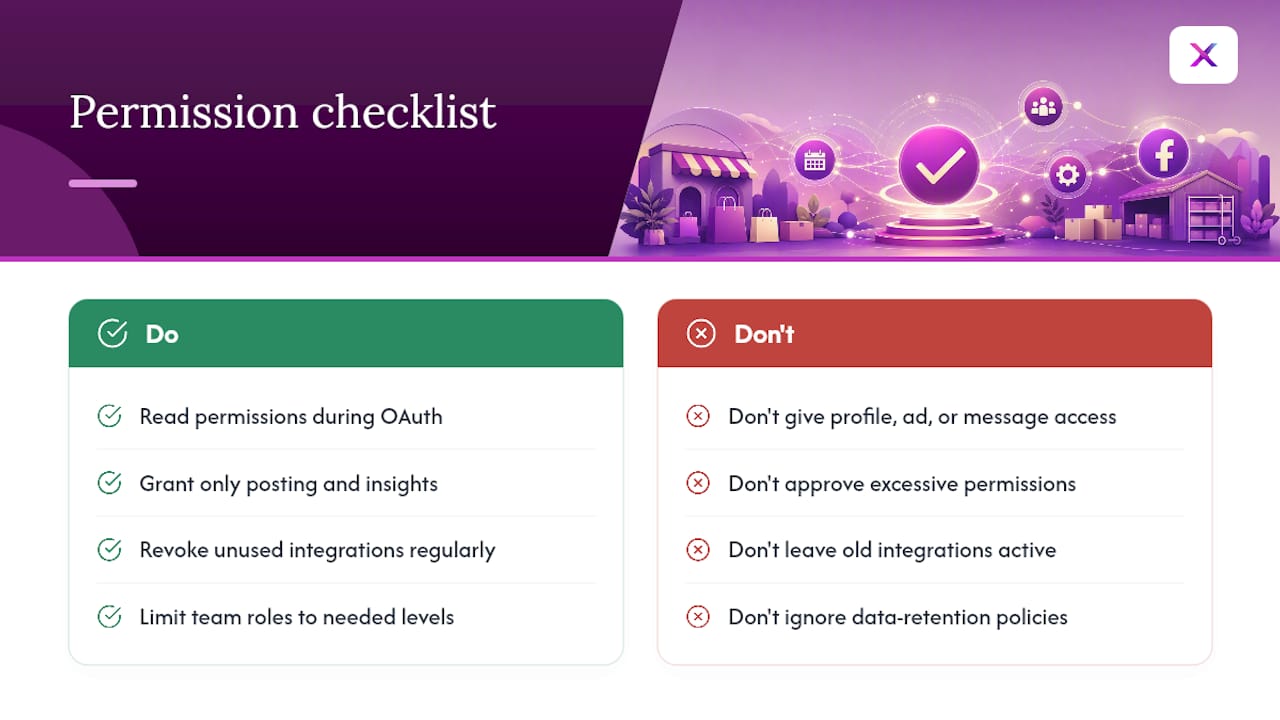
What Permissions Should You Actually Grant an Auto-Posting Tool?
Every auto-posting tool asks for permissions during the Meta OAuth handshake, and it’s worth actually reading what you’re approving instead of clicking through on autopilot.
A scheduler genuinely needs posting access and, if you want analytics inside the tool, read access to Page insights. It does not need access to your personal profile, your ad accounts, or message permissions unless the tool specifically offers a feature that uses them, like auto-replying to comments. If a tool requests more than its stated feature set requires, that’s worth a second look before you approve it.
Review your connected apps inside Meta’s Business Suite settings every few months. It’s common to accumulate half a dozen old integrations from tools you tried once and forgot about, each one still holding live posting access to your Page. Revoke anything you’re not actively using.
For businesses managing multiple Pages, be deliberate about which team members get admin access versus editor or scheduler-only roles. Not everyone touching your content calendar needs the ability to change ad spend or remove other admins. Narrowing permissions by role limits the damage if one login gets compromised.
Data retention matters too. Ask any third-party scheduler how long they store your drafted copy, images, and analytics history, and whether that data gets deleted if you cancel. Reasonable tools state this plainly in their privacy policy; vague answers are a signal to look elsewhere.
Cross-Posting to Instagram, TikTok, and Beyond Without Duplicate Content
Auto-posting to Facebook rarely happens in isolation for a small business. Most are juggling Instagram and increasingly TikTok too, and the temptation to post the exact same asset everywhere is strong because it’s fast.
Resist it where you can. Facebook and Instagram Reels get judged differently by their respective algorithms, and a caption written for Instagram’s more casual tone can read oddly transplanted onto Facebook’s slightly older, more text-tolerant audience. The safest approach is generating platform-specific versions of the same core asset: same product photo or video, different caption length, different hashtag approach, sometimes a different crop.
Integration platforms that handle multi-network posting typically let you customize copy per destination while reusing the same media file, which saves the actual production time without sacrificing the platform-specific tweaks that keep engagement healthy. Tools built specifically for e-commerce, including Xyla AI, automatically resize and adjust product-based content for each network’s native format rather than forcing one asset to fit all of them.
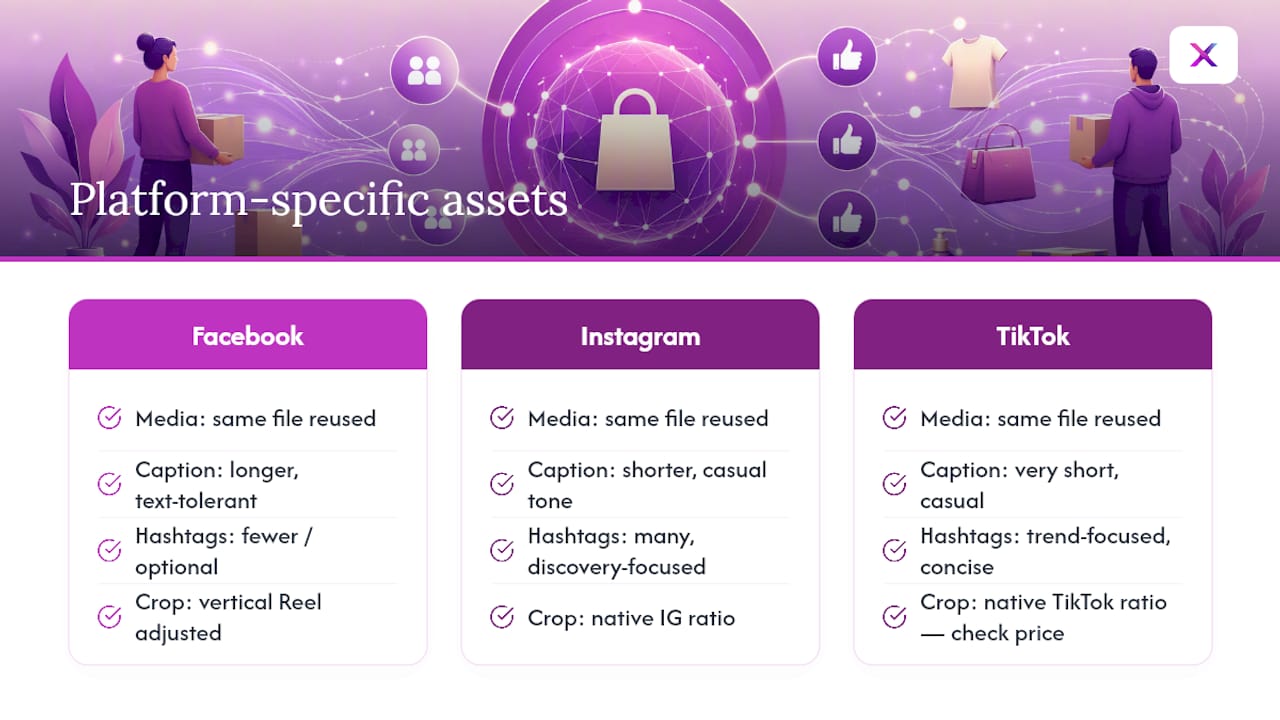
If you’re managing this manually, at minimum swap the caption and check the crop before pushing the same video to a second platform. A vertical Reel cropped correctly for Facebook can end up with a product’s price tag cut off the frame on TikTok if you assume one size fits every feed.
Staying Inside Facebook’s Content and Community Guidelines
Auto-posting doesn’t get a pass on Facebook’s Community Standards just because a tool sent the post instead of a person clicking publish. Meta holds the Page responsible regardless of what generated the content.
The categories that trip up small businesses most often aren’t the dramatic ones. It’s usually promotional overreach: excessive hashtags, misleading claims about discounts or stock (“only 2 left!” when that’s not actually true), or reposting the same offer so frequently it reads as spam even without violating a specific written rule. Facebook’s spam-detection systems weigh posting frequency and content similarity heavily, so a queue that fires off five nearly identical posts in a day is more likely to get throttled than one that varies pacing and phrasing.
Build your review step, whether human or automated, around checking three things before anything publishes: does the copy make a claim you can actually back up, is the image or video something you have rights to use, and does the post look meaningfully different from what you posted in the last few days. A human-in-the-loop review queue catches most of this before it becomes a problem, which is exactly why that workflow keeps coming up throughout this guide.
Why Xyla AI Leans Into Human-in-the-Loop Automation
Full autopilot sounds appealing until an AI-generated caption misfires on a promotional post nobody reviewed. That’s the scenario the human-in-the-loop model exists to prevent, and it’s the approach we’ve built around at Xyla AI: AI drafts the content, a person gets a quick look before it publishes, and only low-risk post types skip that step. Store owners using this model report getting back roughly eight hours a week they used to spend on manual posting and image resizing. The tip worth stealing even if you never touch our tool: never let a promotional post skip human eyes, no matter how good the AI draft looks.
— Toby
Automate Facebook Posting Without Losing Your Product Focus
If you’re running a Shopify, WooCommerce, or Etsy store, the schedulers and native tools covered above work, but they still leave you writing captions, resizing images, and figuring out timing by hand. Some AI platforms can turn your existing product listings directly into scheduled Facebook posts, Reels, and carousels, automatically resized and captioned for the platform, with a review step before anything goes live.

Instead of building a content calendar from scratch, Xyla AI pulls directly from your store catalog and fills the queue for you, so a new product listing can become a scheduled Reel the same afternoon instead of sitting untouched for a week. The step-by-step automation guide walks through connecting your store and setting up your first auto-publish queue in a single sitting. If you’re ready to stop rebuilding the same post three different ways for three different platforms, that’s the place to start.
Where to Learn More About Facebook Auto Posting
For the technical details on scheduling permissions and OAuth setup, Meta’s own scheduling help page stays the most current source. For Reels distribution specifics, the Quintly and Socialinsider comparisons cover discovery differences in more depth than most platform documentation offers.
Sources
- Schedule a post
- Facebook Reels vs. Instagram Reels — comprehensive comparison and guide
- Facebook Reels vs Instagram Reels (Socialinsider)
- Facebook Reels vs Instagram Reels
- AI for social media content (field notes)


